Organizations for B2B Single Sign-On OIDC & SAML
- New to Ory? Talk to the team about features and plans.
- Already a customer? Open a support ticket.
Ory Kratos uses organizations as a way to group users within one project. An organization always belongs to one Ory project. Within a project, an identity can belong to an organization or remain without an organization. Organizations contain multiple OIDC or SAML SSO connections. All members of an organization must use one of the organization's OIDC or SAML SSO connections to log in.
An organization can have multiple domains. Registrations for email addresses with a domain that belongs to an organization must go through one of the organization's OIDC or SAML SSO connections.
Some identity providers do not validate email domain ownership. This can lead to situations where Organization login is configured
for a specified domain such as @example.com, but due to this lack of this email domain ownership validation by the identity
provider, a users with other email domains such as @gmail.com can still authenticate successfully via the identity provider.
This will end up with the user being part of the configured organization in your Ory project, even if the domain does not match any of the configured domains.
Organizations require identifier-first authentication and two-step registration when using Account Experience 2.x or Ory Elements 1.x.
Manage organizations
- Ory Console
- API
To create, update, or delete organizations via the Ory Console, go to
Organizations → All organizations in the Ory Console.
Organizations can also be managed using the Ory API. To authenticate your requests, create a workspace API key.
All examples below use curl to make HTTP requests. You can use any HTTP client to make these requests.
Before copy & pasting the following examples, export your PROJECT_ID and WORKSPACE_API_KEY:
export PROJECT_ID="..."
export WORKSPACE_API_KEY="ory_wak_..."
List organizations
curl -X GET --location "https://api.console.ory.com/projects/$PROJECT_ID/organizations" \
     -H "Authorization: Bearer $WORKSPACE_API_KEY"
Create an organization
curl -X POST --location "https://api.console.ory.com/projects/$PROJECT_ID/organizations" \
     -H "Authorization: Bearer $WORKSPACE_API_KEY" \
     -H "Content-Type: application/json" \
     -d '{
           "label":  "Hello demo",
           "domains": ["test.example.com"]
         }'
Get an organization
curl -X GET --location "https://api.console.ory.com/projects/$PROJECT_ID/organizations/$ORGANIZATION_ID" \
     -H "Authorization: Bearer $WORKSPACE_API_KEY"
Delete an organization
curl -X DELETE --location "https://api.console.ory.com/projects/$PROJECT_ID/organizations/$ORGANIZATION_ID" \
     -H "Authorization: Bearer $WORKSPACE_API_KEY"
Create SSO connections for an organization
After creating an organization, continue by adding one or more SSO OIDC connections.
- Ory Console
- API
Go to Organizations → All organizations in the Ory Console and continue by configuring the selected organization.
The SSO connections are part of the project configuration. To authenticate, use the same workspace API key as for managing organizations. The examples use curl to make HTTP requests and jq to parse JSON response.
Create an SSO connection
curl -X PATCH --location "https://api.console.ory.com/projects/$PROJECT_ID" \
     -H "Authorization: Bearer $WORKSPACE_API_KEY" \
     -H "Content-Type: application/json" \
     -d '[
           {
             "op": "add",
             "path": "/services/identity/config/selfservice/methods/oidc/config/providers/-",
             "value": {
               "client_id": "...",
               "client_secret": "...",
               "id": "ory-GPx1yPH4",
               "issuer_url": "https://example.org",
               "label": "My OIDC provider",
               "mapper_url": "base64://ZnVuY3Rpb24oY3R4KSBjdHg=",
               "organization_id": "6bb1c7d1-3b3e-4995-9e09-35649dc45a2b",
               "provider": "generic",
               "pkce": "auto", # or "force", "never", see note on redirect URL below
               "scope": ["openid", "offline_access", "email"]
             }
           }
         ]' \
   | jq ".project.services.identity.config.selfservice.methods.oidc.config.providers"
Some notes on the fields of the JSON payload:
client_idandclient_secretare the credentials of the OIDC provider.idis a unique identifier for the connection, and part of the redirect URL, and can be a random string. This is$PROJECT_IDbelow.organization_idis the ID of the organization to which the connection belongs, and part of the redirect URL. This is$ORGANIZATION_IDbelow.mapper_urlis the URL to a JSONnet file that maps the OIDC provider's claims to Ory's identity schema. You can use thebase64scheme to embed the JSONnet file directly in the JSON payload.pkcedetermines whether Ory Identities will use PKCE during the OIDC flow. See the note below and the PKCE documentation for details.
The redirect URL to be set in the external OIDC provider's configuration is
https://$PROJECT_SLUG.projects.oryapis.com/self-service/methods/oidc/organization/$ORGANIZATION_ID/callback/$PROVIDER_ID.
If you set pkce: force, you must whitelist a different redirect URL with the OIDC provider:
https://$PROJECT_SLUG.projects.oryapis.com/self-service/methods/oidc/callback.
See the PKCE documentation for details.
List SSO connections
curl -X GET --location "https://api.console.ory.com/projects/$PROJECT_ID" \
     -H "Authorization: Bearer $WORKSPACE_API_KEY" \
   | jq ".services.identity.config.selfservice.methods.oidc.config.providers"
Result:
[
  {
    "client_id": "...",
    "client_secret": "...",
    "id": "ory-GPx1yPH4",
    "issuer_url": "https://example.org",
    "label": "My OIDC provider",
    "mapper_url": "https://storage.googleapis.com/bac-gcs-production/94292215dbabe405bebff988b5356663fcf5cba35b10fc6ca2cfea7bc7049e906e01d271a3daeb844203efdfbf2cff356274daa63d5afc2a379bbe93b8b40e63.jsonnet",
    "organization_id": "6bb1c7d1-3b3e-4995-9e09-35649dc45a2b",
    "provider": "generic",
    "scope": ["openid", "offline_access", "email"]
  }
]
Delete an SSO connection
To delete an organization, you need to specify the index of the connection in the path field. The index is the position of the
SSO connection in the list of connections.
curl -X PATCH --location "https://api.console.ory.com/projects/$PROJECT_ID" \
     -H "Authorization: Bearer $WORKSPACE_API_KEY" \
     -H "Content-Type: application/json" \
     -d '[
           {
             "op": "remove",
             "path": "/services/identity/config/selfservice/methods/oidc/config/providers/0"
           }
         ]' \
   | jq ".project.services.identity.config.selfservice.methods.oidc.config.providers"
Note that the organization_id field contains the organization ID to which the connection belongs.
See it live
After having set up everything, go to your registration page. Entering an email that ends with the organization's domain, such as
@my.example.com from the example above, shows a Sign in with SSO button instead of the password field. Clicking it will take
you to sign in with the SSO connection. The SSO connection is not visible for email addresses that are not managed by the
organization.
Pre-provisioning identities in an organization
After creating an organization, you can pre-provision identities in it. This is useful when you need to create related data in your system but need the identity to be created in Ory Network first, before the user logs in for the first time.
To achieve this, set the organization_id property to the ID of the created organization in the identity, either when creating
the identity, or by updating the identity's data using the Ory APIs.
To automate provisioning from an external identity provider instead, configure a SCIM client for the organization. The SCIM server creates and updates identities in the organization automatically. Because an identity can belong to only one organization, provisioning a user that already exists in a different organization fails with a conflict — see How SCIM relates to organizations for the full behavior and how to resolve it.
Bind an identity to an organization through the settings flow
A signed-in user can join an organization by linking one of its SSO connections through the
settings flow. When the user completes the link, Ory sets the identity's
organization_id to that organization. There is no need to sign the user out or to pre-provision the identity.
To scope a settings flow to an organization, pass the organization ID in the organization query parameter when you initialize
the flow:
https://$PROJECT_SLUG.projects.oryapis.com/self-service/settings/browser?organization=$ORGANIZATION_ID
The same parameter works for the API (native) flow at /self-service/settings/api.
Ory only honors the organization query parameter when one of the identity's email addresses is under the organization's
configured domains. This prevents any signed-in user from scoping a flow to an arbitrary organization and enumerating its SSO
connections. When no email address matches, the flow silently falls back to a regular, unscoped settings flow.
The check uses the identity's email verifiable addresses. An identity whose schema has no verification.via: email annotation has
no email verifiable address and therefore cannot use the organization query parameter. This domain check does not apply when the
identity is already bound to an organization — see below.
An organization-scoped settings flow behaves differently from a regular settings flow:
- The settings flow returns link nodes only for the organization's OIDC and SAML connections. Other settings methods, such as password or social sign-in, are not part of the flow.
- Connections the identity has already linked render as disabled. The organization owns the binding, so the user cannot remove it.
- Submitting a link starts authentication with the organization's identity provider. On the callback, Ory links the credential and
sets the identity's
organization_id. - Unlink submissions are rejected. To remove a member from an organization, use the identity admin API.
When the signed-in identity is already bound to an organization, that organization takes precedence over the organization query
parameter. An identity cannot be silently re-bound to a different organization through the settings flow.
If the identity's organization_id points to an organization that was deleted, the settings flow falls back to a non-organization
scoped flow. This keeps account recovery and self-service settings working for users who were offboarded from a deleted
organization.
Multi-factor authentication for organization members
Organization members can complete second factors such as TOTP or WebAuthn to reach the aal2 authenticator assurance level.
Before a second factor completes, Ory verifies that the session was authenticated through an OIDC or SAML SSO connection that is
currently configured for the member's organization. A session without that proof — for example one whose SSO connection was
removed or moved to a different organization since sign-in — cannot complete a second factor. The user must sign in through the
organization's SSO connection again first.
Organization ID in OAuth2 and OpenID Connect tokens
When an organization member signs in through an Ory OAuth2 / OpenID Connect flow using the hosted consent screen (Account Experience), the issued tokens carry the identity's organization ID:
organization_idin the ID token claims.organization_idin the access token session data, surfaced underextin JWT access tokens and promotable to a top-level claim.
Identities that don't belong to an organization get no such claim. For configuration details and behavior, see Organization ID claim.
SAML
SAML (Security Assertion Markup Language) is an XML-based open standard used for exchanging authentication and authorization data between parties. The SAML integration in Ory Network uses the B2B Organization feature.
SAML via Ory Network
This guide will walk you through the steps required to set up SAML Single Sign-On (SSO) with Ory Network.
Prerequisites
Before proceeding, ensure you are on a plan that supports SAML SSO. SAML is available exclusively on select Enterprise plans. Contact us if you need SAML support.
- Ory Console
- API
- Go to Organizations → All organizations in the Ory Console to create an organization.
- Select "Add a new Enterprise SAML SSO connection" and follow the instructions to configure the SAML connection. Fill out the following form fields:
- Label: A descriptive name for the SAML connection. This will be displayed to users.
- Data mapping: A mapping from the SAML attributes to Ory's identity schema.
- Raw IDP metadata XML: The XML metadata file from your SAML Identity Provider (IdP).
- After saving, copy the ACS URL and SP metadata URL shown in the provider details dialog. Use these values when configuring the SAML application in your Identity Provider.
- Navigate to your login screen to test the SAML connection.
Create an organization
curl -X POST --location "https://api.console.ory.com/projects/$PROJECT_ID/organizations" \
     -H "Authorization: Bearer $WORKSPACE_API_KEY" \
     -H "Content-Type: application/json" \
     -d '{
           "label":  "SAML organzation",
           "domains": ["example.com"]
         }'
Enable SAML authentication
curl -X PATCH --location "https://api.console.ory.com/projects/$PROJECT_ID" \
     -H "Authorization: Bearer $WORKSPACE_API_KEY" \
     -H "Content-Type: application/json" \
     -d '[
           {
             "op": "replace",
             "path": "/services/identity/config/selfservice/methods/saml/enabled",
             "value": true
           }
         ]' \
   | jq ".project.services.identity.config.selfservice.methods.saml"
Create a SAML connection
curl -X PATCH --location "https://api.console.ory.com/projects/$PROJECT_ID" \
     -H "Authorization: Bearer $WORKSPACE_API_KEY" \
     -H "Content-Type: application/json" \
     -d '[
           {
             "op": "add",
             "path": "/services/identity/config/selfservice/methods/saml/config/providers/-",
             "value": {
               "id": "some-provider-id",
               "label": "My SAML provider",
               "mapper_url": "base64://...",
               "raw_idp_metadata_xml": "base64://...",
               "organization_id": "$ORGANIZATION_ID"
             }
           }
         ]' \
   | jq ".project.services.identity.config.selfservice.methods.saml"
After creating the provider, configure your IdP with the provider's ACS URL. You can copy the ACS URL from the provider details
page in the Console, or construct it from the project configuration. The URLs below apply to providers on the default SAML engine
(Polis), which is used when the provider doesn't set engine or sets it to jackson. Providers on the native engine use
different URLs; see Native SAML engine.
By default, all providers of a project share one ACS URL:
- Default:
https://$PROJECT_SLUG.projects.oryapis.com/saml/api/oauth/saml - Custom audience base URL (
audience_override_base_url):https://$CUSTOM_DOMAIN/saml/api/oauth/saml - Proxy ACS URL (
proxy_acs_url):$PROXY_ACS_URL
When the project has per-provider ACS URLs enabled, a new provider gets its own ACS URL, which ends in the provider ID:
- Default:
https://$PROJECT_SLUG.projects.oryapis.com/saml/api/oauth/saml/$PROVIDER_ID - Custom audience base URL (
audience_override_base_url):https://$CUSTOM_DOMAIN/saml/api/oauth/saml/$PROVIDER_ID - Proxy ACS URL (
proxy_acs_url):$PROXY_ACS_URL/$PROVIDER_ID
Replace $PROJECT_SLUG with your project slug and $PROVIDER_ID with the provider ID you assigned (the id field in the request
above, some-provider-id in the example; the Console API and the onboarding portal expose the same value as provider_id). The
host of a per-provider ACS URL identifies the project, so the same provider ID can be used in several projects — for example a
development and a production project connected to the same Google Workspace.
Within one project, give every SAML provider its own provider ID. The API does not reject a duplicate provider ID, but providers that share one also share their callback URL and ACS URL, and the configuration of one can be applied to the other. Sign-ins through one or both of them can then fail. The onboarding portal refuses a provider ID that is already in use in the project.
- id: The provider ID. It must be 4 to 64 characters from
A-Z,a-z,0-9,.,~,_and-. It is part of a per-provider ACS URL, so treat it as permanent: changing it creates a new SAML connection, and with per-provider ACS URLs the IdP application has to be updated with the new ACS URL before users can sign in again. - label: A descriptive name for the SAML connection. This will be displayed to users.
- mapper_url: A mapping from the SAML attributes to Ory's identity schema.
- raw_idp_metadata_xml: The XML metadata file from your SAML Identity Provider (IdP).
Shared and per-provider ACS URLs
On the default engine (Polis), the providers of a project share one ACS URL unless the project enables per-provider ACS URLs. With the shared ACS URL, Ory selects the connection by the entity ID of the IdP that sent the SAML response, so every provider in the project needs an IdP with a different entity ID.
Enable per-provider ACS URLs when several providers use the same IdP entity ID (for example Google Workspace, where one IdP serves
several SAML applications). Each new provider then gets its own ACS URL, and the trailing /$PROVIDER_ID path segment selects the
connection.
To enable per-provider ACS URLs, go to Project settings → Advanced in the Ory Console and turn on Per-provider SAML ACS
URLs. The setting is stored as the polis.per_provider_acs_url feature flag of the project and is disabled by default.
The setting applies when a provider is created. A provider keeps the ACS URL it was created with, so you can change the setting without updating the IdP application of an existing provider:
- A provider created while the setting is disabled stays on the shared ACS URL after you enable it.
- A provider created while the setting is enabled keeps its own ACS URL after you disable it. The provider's
acs_urlfield holds that URL.
If you show the ACS URL in your own SSO setup flow before the provider exists, derive it from the setting: use the shared ACS URL
when polis.per_provider_acs_url is false, and append /$PROVIDER_ID when it is true.
If your project uses a proxy ACS URL (proxy_acs_url) together with per-provider ACS URLs, the proxy must forward the trailing
/$PROVIDER_ID path segment to Ory unchanged, because the segment is what selects the connection.
Native SAML engine
Providers that set engine to native are processed by Ory directly instead of by Polis. This engine is in preview and must be
enabled for the project first. Its SAML endpoints are derived from the project's canonical URL,
https://$PROJECT_SLUG.projects.oryapis.com, and the provider ID. They don't use your custom domain, and proxy_acs_url does not
apply. Configure the IdP with these URLs; custom-domain URLs don't match the ACS URL and SP entity ID that native SAML checks
responses against.
- ACS URL:
https://$PROJECT_SLUG.projects.oryapis.com/self-service/methods/saml/acs/$PROVIDER_ID - SP entity ID:
https://$PROJECT_SLUG.projects.oryapis.com/self-service/methods/saml/metadata, orsp_entity_id_overridewhen set - SP metadata:
https://$PROJECT_SLUG.projects.oryapis.com/self-service/methods/saml/metadata/$PROVIDER_ID
The SP metadata document carries the ACS URL, the entity ID, and the signing certificate, so the simplest way to configure the IdP is to import it. The Console shows all three values in the provider details dialog.
Switching a provider between the default engine and the native engine changes its ACS URL and SP entity ID, so the IdP application has to be updated with the new values before users can sign in again.
By default, every project update writes the SAML connections of all providers of the project. To write only the connections of the
providers an update changes, go to Project settings → Advanced in the Ory Console and turn on Write only changed SAML
connections. The setting is stored as the polis.saml_delta_sync feature flag of the project and is disabled by default.
With the setting turned on, a single project update, whether made in the Ory Console or with PUT or PATCH on the project, can
add, change, or remove at most 25 SAML providers in total. An update over the limit is rejected with a 400 Bad Request error and
changes nothing. To change more providers, split the change across several updates.
Data mapping
You can configure the mapping of SAML attributes to Ory's identity schema using Jsonnet. All custom SAML attributes defined at the
Identity Provider (IdP) will be available in the raw_claims object within claims. These attributes can then be mapped to the
Ory identity schema.
Ensure that the appropriate identity schema is created before mapping attributes. The email attribute is natively available in
claims.email, everything else is nested under claims.raw_claims.
Example SAML data mapping
Mapping firstName and lastName from the SAML Identity Provider to the Ory identity schema (traits).
local claims = std.extVar('claims');

{
  identity: {
    traits: {
      email: claims.email,
      [if std.objectHas(claims, "raw_claims") && std.objectHas(claims.raw_claims, "firstName") then "firstName" else null]: claims.raw_claims.firstName,
      [if std.objectHas(claims, "raw_claims") && std.objectHas(claims.raw_claims, "lastName") then "lastName" else null]: claims.raw_claims.lastName,
    },
  },
}
Update identity on login
By default, Ory runs the data mapper only the first time a user signs in through a SAML connection. To keep identity data in sync
with the SAML identity provider (IdP), set update_identity_on_login to automatic on the connection. With this setting, Ory
re-runs the connection's Jsonnet data mapper on every SAML login and updates the identity's traits and metadata whenever they
change.
Use automatic when the SAML IdP is the source of truth for attributes that change over time, such as group memberships, roles, or profile information.
The default is never. Existing SAML connections keep their current behavior until you opt in.
- Ory Console
- API
- Go to Organizations → All organizations in the Ory Console and open the organization that holds the SAML connection.
- Edit the Enterprise SAML SSO connection.
- Set Update identity on login to automatic.
To enable it, set update_identity_on_login on the connection you want to update. Change the provider index (0 in the example
below) to match your connection's position in the providers array.
curl -X PATCH --location "https://api.console.ory.com/projects/$PROJECT_ID" \
     -H "Authorization: Bearer $WORKSPACE_API_KEY" \
     -H "Content-Type: application/json" \
     -d '[
           {
             "op": "replace",
             "path": "/services/identity/config/selfservice/methods/saml/config/providers/0/update_identity_on_login",
             "value": "automatic"
           }
         ]' \
   | jq ".project.services.identity.config.selfservice.methods.saml"
Access the current identity in the mapper
When you set update_identity_on_login to automatic, Ory passes the current identity to the data mapper as an additional variable
std.extVar('identity'). Use it to write conditional logic — for example, to preserve trait values a user has already set, or to
merge SAML IdP data selectively. The identity variable holds the identity's current traits, metadata_public, and
metadata_admin.
local claims = std.extVar('claims');
local identity = std.extVar('identity');

// Keep the display name if the user has set one, otherwise use the value from the IdP (if any).
local displayName = std.get(identity.traits, "display_name", std.get(claims.raw_claims, "displayName", ""));

{
  identity: {
    traits: {
      email: claims.email,
      [if displayName != "" then "display_name" else null]: displayName,
      // Always update groups from the IdP.
      [if std.objectHas(claims, "raw_claims") && std.objectHas(claims.raw_claims, "groups") then "groups" else null]:
        claims.raw_claims.groups,
    },
  },
}
Ory also passes the existing identity to the mapper during account linking. This happens when a user signs in through an SSO connection for the first time and both of the following are true:
- The mapper output doesn't satisfy the identity schema, for example because the identity provider doesn't send a required trait.
- The sign-in conflicts with an existing identity, for example because the email address is already registered.
Ory then evaluates the mapper a second time with std.extVar('identity') set to the existing identity. If the result satisfies
the identity schema, the user goes straight to the sign-in screen that confirms the link with an existing credential, and isn't
asked for the missing traits. Otherwise, Ory asks the user for the missing traits as before.
A mapper opts in by falling back to the existing traits:
local claims = std.extVar('claims');
local identity = std.extVar('identity');

{
  identity: {
    traits: {
      email: claims.email,
      // The identity provider doesn't send a name. Reuse the name of the existing identity when linking.
      [if "name" in identity.traits then "name" else null]: identity.traits.name,
    },
  },
}
Linking only adds the SSO credential to the existing identity. It doesn't change the identity's traits, and Ory never shows the
existing identity's traits to the user before they confirm the link. A mapper that doesn't read std.extVar('identity') behaves
as before.
Behavior details
- Metadata preservation. When the mapper omits
metadata_publicormetadata_adminfrom its output, Ory preserves the existing values. When the mapper explicitly outputs{}, the field is cleared. - Schema validation. Before Ory persists the identity, it validates the update against the identity schema. If the mapper produces invalid traits, Ory fails the login with a validation error.
- No credential changes. This feature never modifies credentials or verified addresses.
Signing certificate expiry details
The SAML connection includes a valid_to attribute, which is an array of expiry dates for the signing certificates associated
with the connection.
Each date is returned in the same format as Node.js crypto.X509Certificate.validTo, matching OpenSSL’s textual representation:
MMM dd HH:mm:ss yyyy GMT
Example:
Jun 10 09:16:40 2038 GMT
You can use this information to externally monitor certificate expirations or integrate it into your internal workflows and alerting systems as needed.
Break-glass account recovery for SSO
When an organization's SSO provider is unavailable, organization members can't sign in. Break-glass account recovery lets designated users bypass SSO enforcement and recover access through email-based recovery.
Each recovery address has a break_glass_for_organization field that stores the organization UUID it applies to. Recovery is only
allowed when this field matches the identity's current organization. If the user moves to a different organization, the flag
doesn't carry over.
For Ory Network users, the easiest way to manage this is through the Ory Console SSO settings.
Set break-glass via the identity admin API
Set the break_glass_for_organization field on a recovery address to the organization's UUID:
curl -X PATCH "https://$PROJECT_SLUG.projects.oryapis.com/admin/identities/$IDENTITY_ID" \
     -H "Authorization: Bearer $ORY_API_KEY" \
     -H "Content-Type: application/json" \
     -d '[
           {
             "op": "replace",
             "path": "/recovery_addresses/0/break_glass_for_organization",
             "value": "$ORGANIZATION_ID"
           }
         ]'
To disable break-glass recovery, set the value to the nil UUID:
curl -X PATCH "https://$PROJECT_SLUG.projects.oryapis.com/admin/identities/$IDENTITY_ID" \
     -H "Authorization: Bearer $ORY_API_KEY" \
     -H "Content-Type: application/json" \
     -d '[
           {
             "op": "replace",
             "path": "/recovery_addresses/0/break_glass_for_organization",
             "value": "00000000-0000-0000-0000-000000000000"
           }
         ]'
Grant break-glass recovery only to a small number of trusted users. Any user with this flag can bypass SSO and recover their account through email.
Self-service organization onboarding
- New to Ory? Talk to the team about features and plans.
- Already a customer? Open a support ticket.
The onboarding portal is a powerful tool designed to simplify complex identity and access management tasks for businesses and their partners.
Streamline organization onboarding
The onboarding portal simplifies setting up and managing identity connections with external organizations.
The onboarding portal aims to:
- Simplify complex integrations: A self-service or guided experience removes the need for client IT administrators to be SAML/SCIM experts.
- Reduce onboarding time: External administrators configure connections directly through a user-friendly interface instead of lengthy manual setup and back-and-forth communication.
- Enhance security and control: Shareable links don't expose sensitive information. Administrators configure their side securely while maintaining control over their IdP settings.
- Enable self-service: SaaS providers can let customers manage their own SSO/SCIM connections, freeing up engineering and support teams.
- Scale B2B integrations: Manual management becomes unsustainable as enterprise clients grow. The portal provides a scalable solution.
- Validate instantly: Test SSO connections immediately to verify integration before deployment, reducing troubleshooting time.
The onboarding is relevant for SaaS providers serving B2B or B2B2C customers, enterprise IT administrators managing identity providers, and developers building multi-tenant applications.
Provider support:
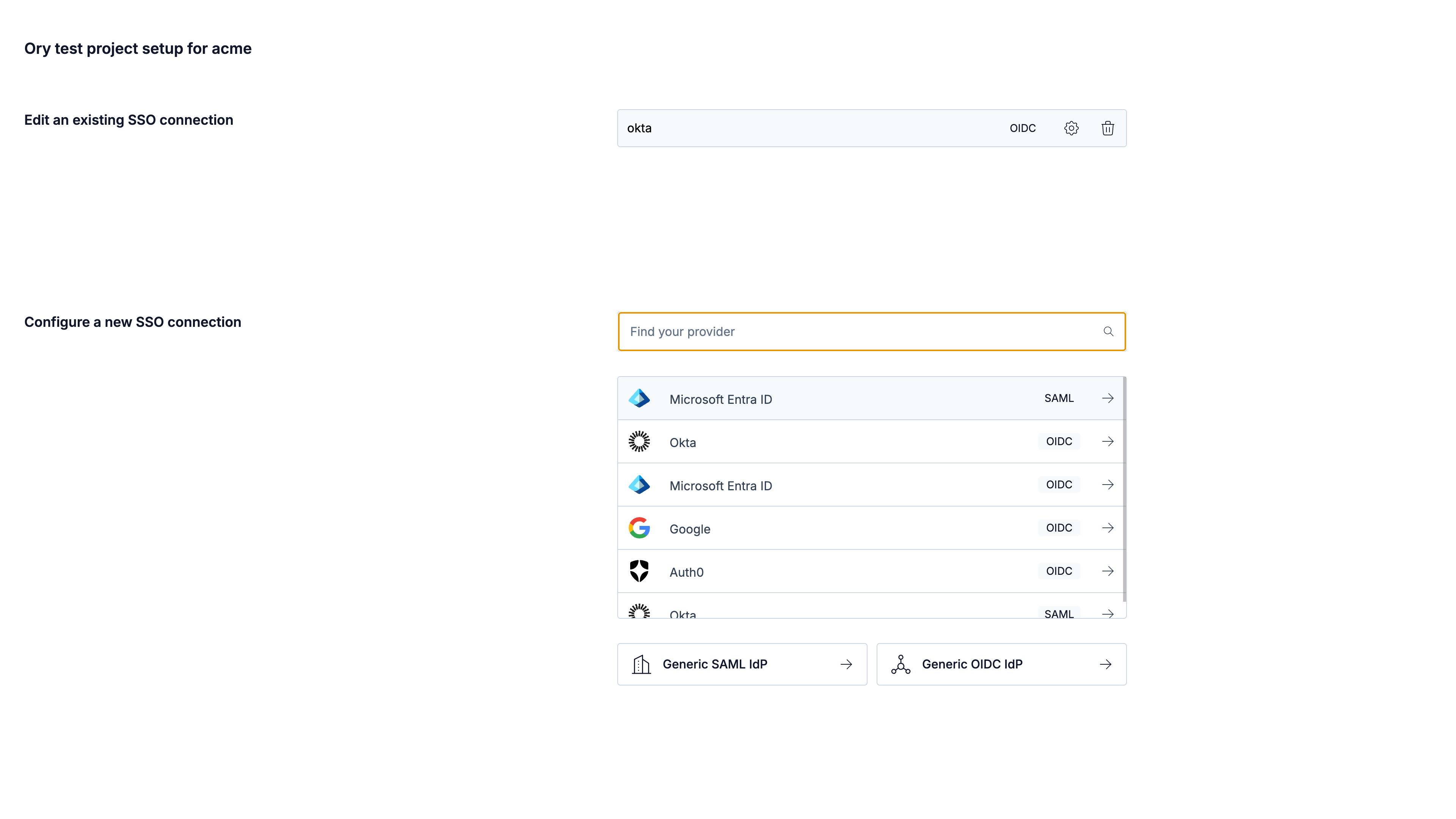
- The onboarding portal supports all well known providers. You can also connect any SAML/OIDC compliant provider using the Generic SAML/OIDC IdP option. If you don't find your provider listed, please contact Ory Support.
SCIM support
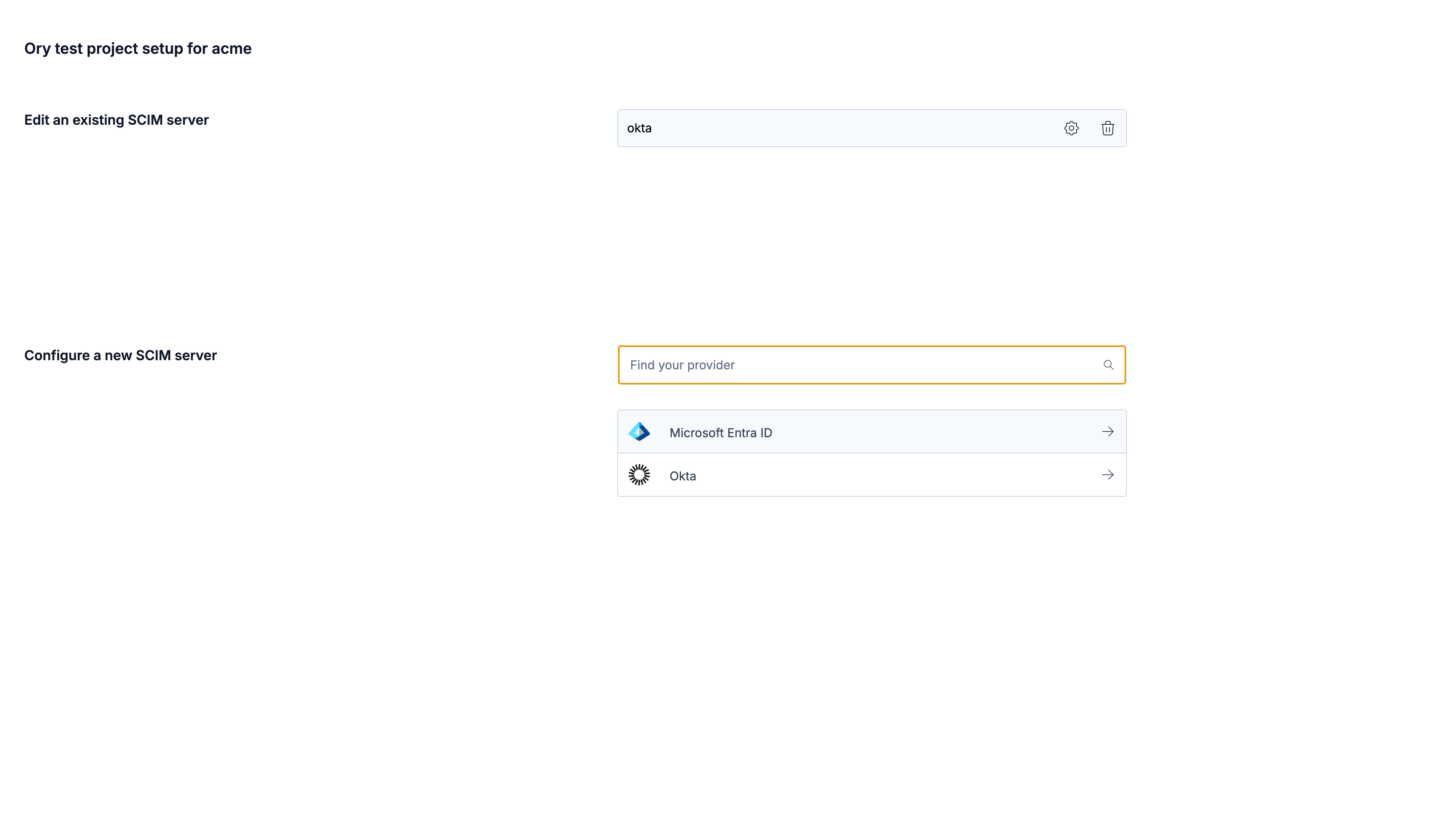
The onboarding portal allows you to set up SCIM provisioning. For an organization, you can create, update, and remove SCIM servers. Guided walkthroughs are available for Microsoft Entra ID, Google Workspace, and Okta.
IdP-initiated login
SAML connections support IdP-initiated login, where people start the login from their identity provider instead of from your application. Organization administrators turn it on for their connection in the onboarding portal, and project administrators can do the same in the Ory Console. It is off by default.
IdP-initiated login is inherently open to login CSRF: anyone who can reach the assertion consumer service can start a login for an account they control and try to complete it in another person's browser. Turn it on only for connections whose identity provider requires it, and make sure your application does not treat the first authenticated session after an IdP-initiated login as proof of intent for a sensitive action.
Manage onboarding portal links
- Ory Console
- API
Create a link
Go to Organizations → All organizations in the Ory Console and continue by configuring the selected organization.
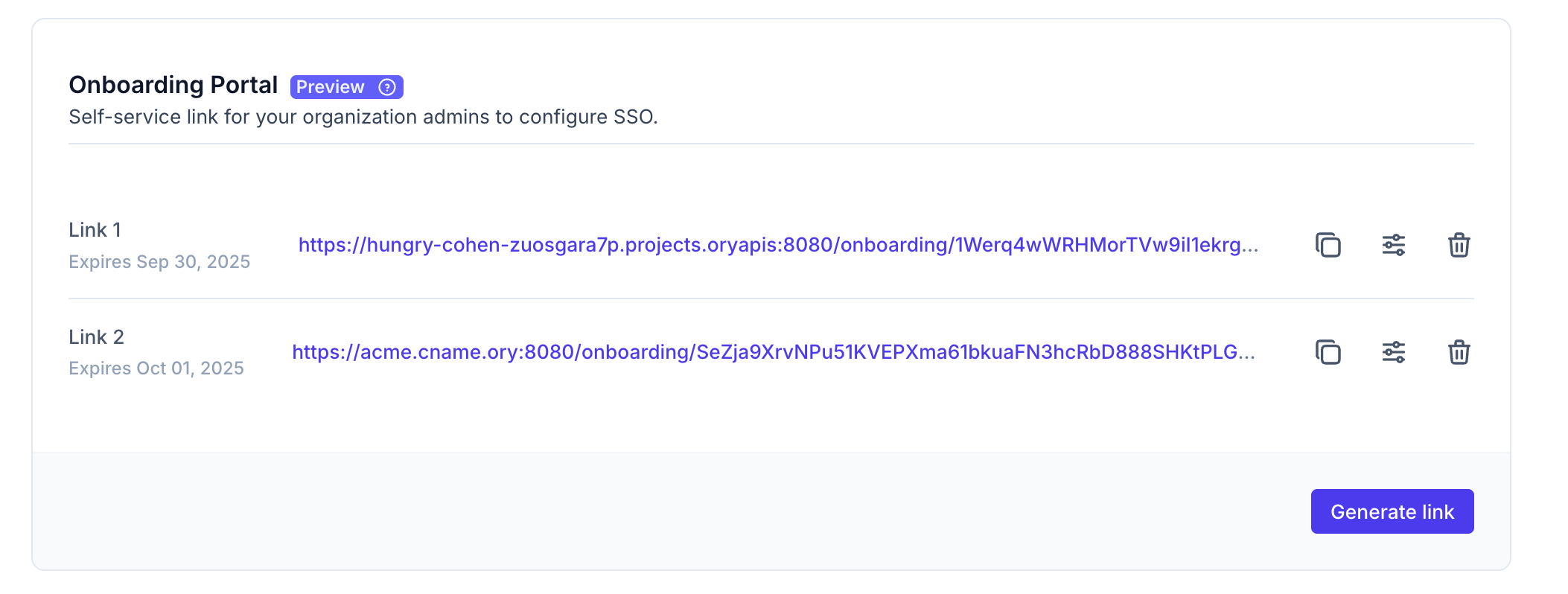
On the Edit Organization page, under the Onboarding Portal section, click Generate link. If your project has a custom domain configured, you must choose between the project slug and the custom domain as the link's base URL. You can then share this link with the organization administrators.
Configure provider-specific data mappings
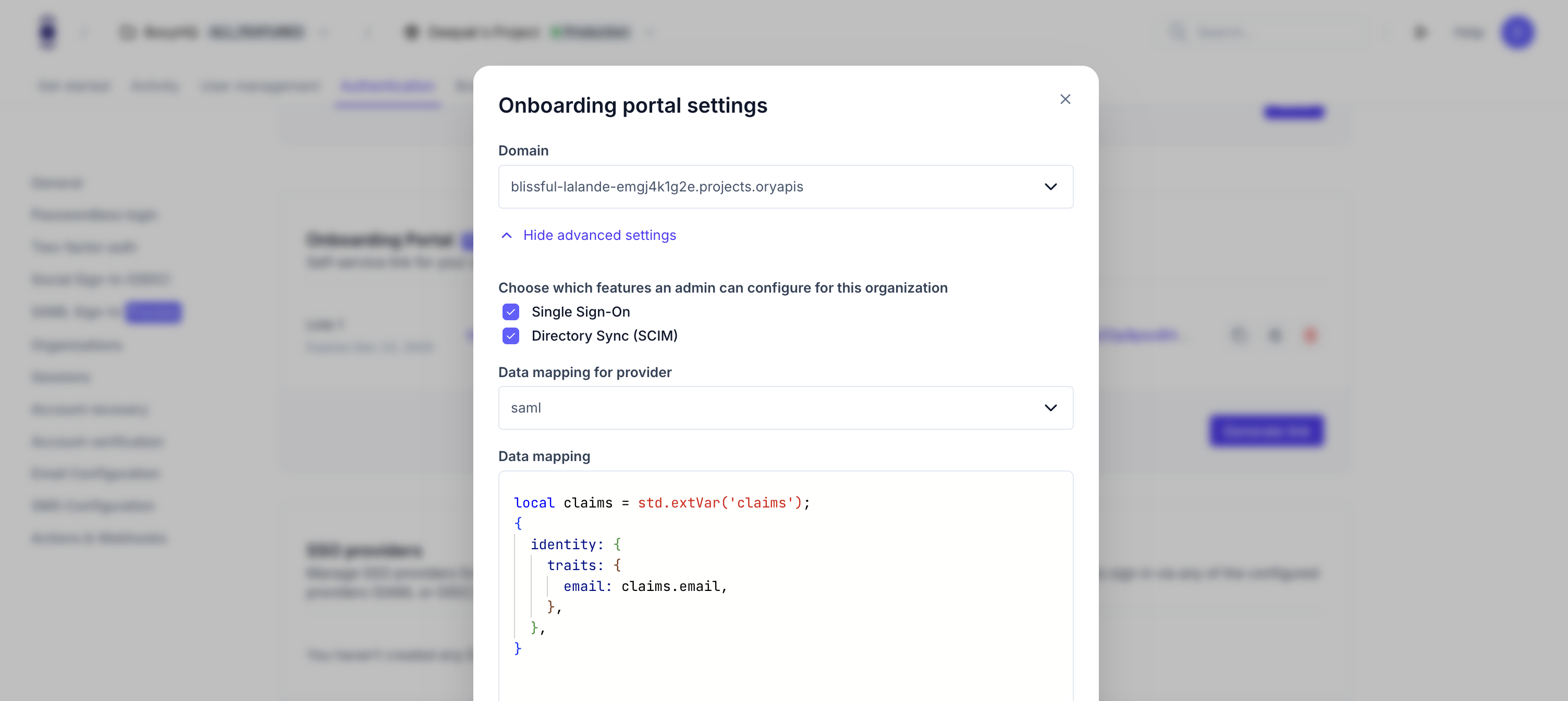
You configure data mappers in the Onboarding Portal by attaching a Jsonnet script to each provider that supports mapping (for example, social sign-in providers, SAML, SCIM).
The mapper must return an object like:
local claims = std.extVar('claims');  // or std.extVar('scim') for SCIM

{
  identity: {
    traits: {
      // map incoming data to your identity schema traits
      [if 'email' in claims then 'email' else null]: claims.email,
    },
  },
}
For SAML organizations, SAML attributes are available under claims.email and claims.raw_claims.
SAML mapping
For SCIM provisioning, the SCIM user object is available as std.extVar('scim') and you map it to the identity in the same way.
SCIM mapping
For social sign-in, all upstream data is available as std.extVar('claims'), including standard claims and any raw_claims for
non-standard fields.
Social Sign-In mapping
Onboarding portal links can also be managed using the Ory API. To authenticate your requests, create a workspace API key. All examples below use curl to make HTTP requests. You can use any HTTP client to make these requests. Before copy & pasting the following examples, export your PROJECT_ID,ORGANIZATION_ID and WORKSPACE_API_KEY:
Create an onboarding portal link
curl -X POST --location "https://api.console.ory.com/projects/$PROJECT_ID/organizations/$ORGANIZATION_ID/onboarding-portal-links" \
     -H "Authorization: Bearer $WORKSPACE_API_KEY" \
     -H "Content-Type: application/json" \
     -d '{
           "expires_at": "2025-06-01T00:00:00Z",
           "enable_sso": true,
           "enable_scim": true,
           "custom_hostname_id": "use a custom domain id from branding, omit the field otherwise",
           "saml_mapper_url": "base64://{BASE64_ENCODED_JSONNET}"
         }'
Result:
{
  "id": "d36ad207-e1a8-4eac-bc1b-c25e223cc15b",
  "value": "Fhca7DvuRLjQpDslMpYHMfsqSoy7vbI92PAxNlziZDidGBiW",
  "project_id": "836b03f7-fdce-466a-9407-8595a0f615ce",
  "organization_id": "517cc5e7-1ab6-4dcf-ba02-00fad003af92",
  "enable_sso": true,
  "enable_scim": true,
  "created_at": "2025-06-02T05:23:45.299988Z",
  "expires_at": "2025-06-03T05:23:45Z",
  "custom_hostname_id": "aa4c8766-02b8-423a-80d2-47adf8e8c2ca"
}
The response contains a value token that you can use to construct the onboarding portal link as follows:
https://your-slug.projects.oryapis.com/onboarding/<value>
Update an onboarding portal link
curl -X POST --location "https://api.console.ory.com/projects/$PROJECT_ID/organizations/$ORGANIZATION_ID/onboarding-portal-links/$ONBOARDING_PORTAL_LINK_ID" \
     -H "Authorization: Bearer $WORKSPACE_API_KEY" \
     -H "Content-Type: application/json" \
     -d '{
           "expires_at": "2025-06-01T00:00:00Z",
           "enable_sso": true,
           "enable_scim": true
         }'
Result:
{
  "id": "655fa1d7-8404-4aa5-a90d-7f0aee060bc6",
  "value": "emH8rO0f9S8VtLXLhBdNc9vBPSgsoT3qYHQQd7ROf8HwMmtK",
  "project_id": "94d32bfd-08ea-4a11-a026-b9d7ddda0f09",
  "organization_id": "9e83d579-ba29-43dd-b245-28c525c82066",
  "enable_sso": true,
  "enable_scim": true,
  "created_at": "2025-08-21T15:48:00.101704Z",
  "expires_at": "2027-06-01T00:00:00Z"
}
Delete an onboarding portal link
curl -X DELETE --location "https://api.console.ory.com/projects/$PROJECT_ID/organizations/$ORGANIZATION_ID/onboarding-portal-links/$ONBOARDING_PORTAL_LINK_ID" \
     -H "Authorization: Bearer $WORKSPACE_API_KEY"
List onboarding portal links
curl -X GET --location "https://api.console.ory.com/projects/$PROJECT_ID/organizations/$ORGANIZATION_ID/onboarding-portal-links" \
     -H "Authorization: Bearer $WORKSPACE_API_KEY"
Result:
{
  "links": [
    {
      "id": "d6458578-dbeb-45ee-95e7-3b98168ff313",
      "value": "eHSoZlTTffFP76ns0DOqBI8CT2daCXqRqO3MSVFi7eEbaRIu",
      "project_id": "836b03f7-fdce-466a-9407-8595a0f615ce",
      "organization_id": "517cc5e7-1ab6-4dcf-ba02-00fad003af92",
      "enable_sso": true,
      "enable_scim": true,
      "created_at": "2025-06-02T05:44:24.883665Z",
      "expires_at": "2025-06-03T05:44:24Z"
    }
  ]
}
Expiry
The link generated from the Ory Network Console expires in 7 days. The API allows you to set an expiration value with a minimum expiry of 1 day. Once the link expires, it no longer works. You can also delete the link and generate a new one.
Handover and using the portal
Once you generate the link, share it with the organization's administrator. They can access this link multiple times until its expiration to manage SSO and SCIM connections.
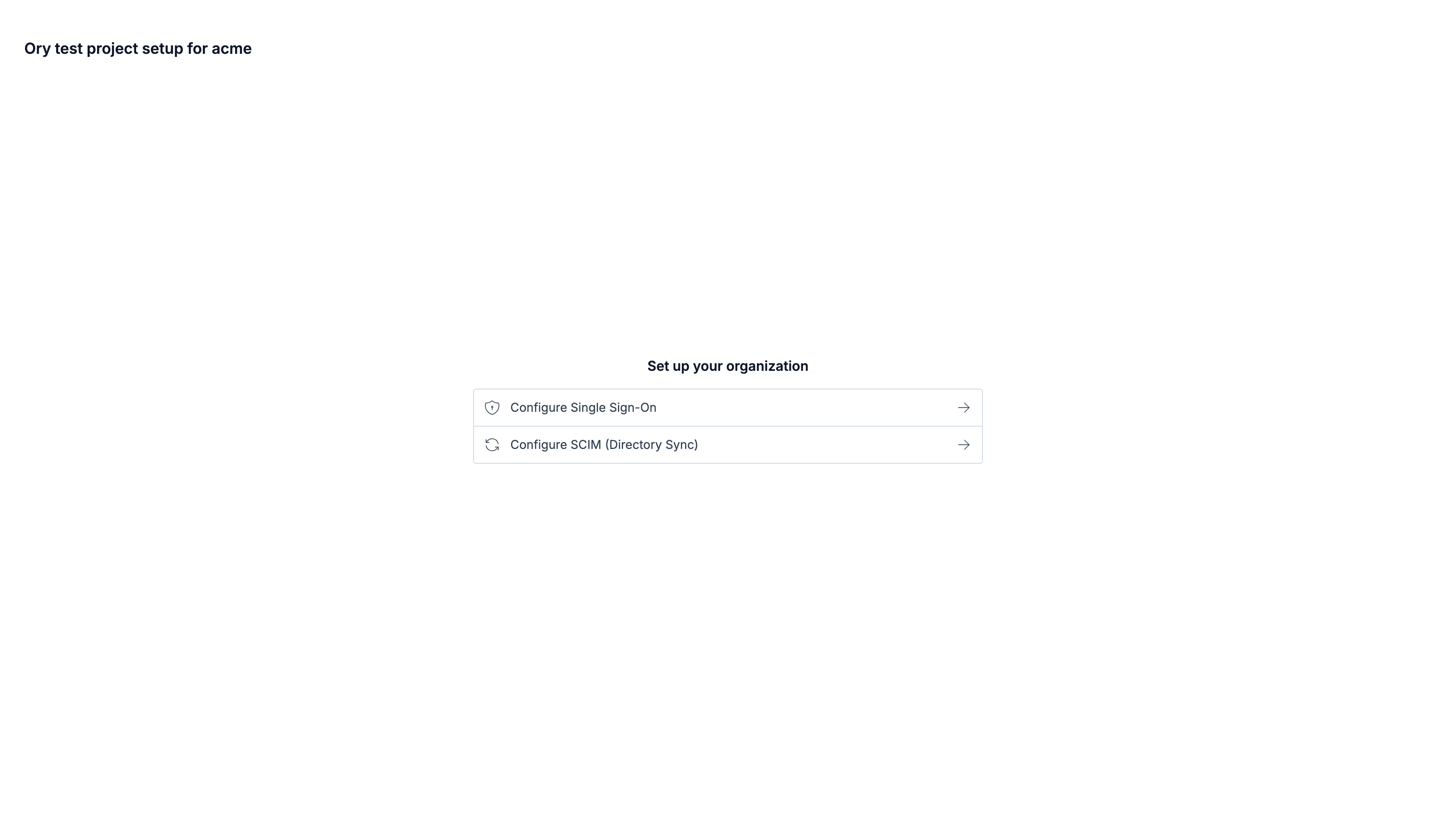
Manage SSO
Manage SCIM