Customize identity schemas
This document explains how to customize your identity model with a custom identity schema. A custom identity schema allows you to add custom fields to your identities such as birthday or job title.
It is important to note that throughout this document we use specific draft-07 features of JSON Schema as shown by the $schema
property at the start of every document.
{
  $schema: "http://json-schema.org/draft-07/schema#",
}
Use the JSON Schema Validator to check your identity schema. If you're not familiar with JSON Schemas, study the official examples to get familiar with the structure.
Writing your first custom identity schema
This is the minimum viable identity schema:
{
  "$schema": "http://json-schema.org/draft-07/schema#",
  "type": "object",
  "properties": {
    "traits": {
      "type": "object"
    }
  }
}
Traits translate into fields presented in the user-facing UI. In the minimum viable identity schema, there are no traits which means that the UI doesn't present any fields. Let's change that by adding three fields:
- first name
- last name
- username
- Identity schema
- Generated UI
{
  "$schema": "http://json-schema.org/draft-07/schema#",
  "type": "object",
  "properties": {
    "traits": {
      "type": "object",
      "properties": {
        "username": {
          "title": "Username",
          "type": "string"
        },
        "name": {
          "type": "object",
          "properties": {
            "first": {
              "title": "First name",
              "type": "string"
            },
            "last": {
              "title": "Last name",
              "type": "string"
            }
          }
        }
      }
    }
  }
}
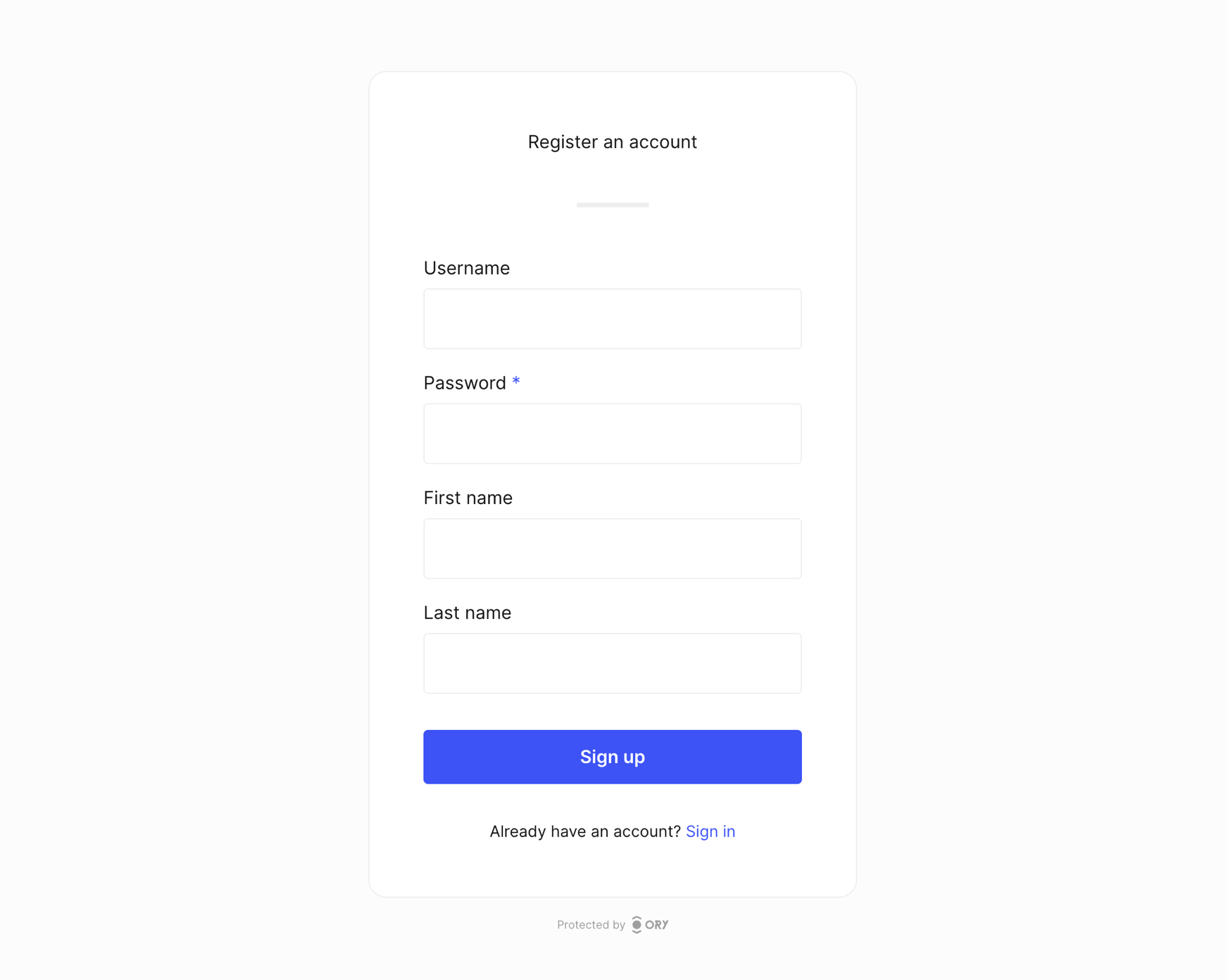
To log in, the user needs to provide their ID and password. The identity schema does not yet state which field is the ID used for login. Let's change that by adding the following schema extension:
{
  "$schema": "http://json-schema.org/draft-07/schema#",
  "type": "object",
  "properties": {
    "traits": {
      "type": "object",
      "properties": {
        "username": {
          "title": "Username",
          "type": "string",
          "ory.sh/kratos": {
            "credentials": {
              "password": {
                "identifier": true
              }
            }
          }
        },
        "name": {
          "type": "object",
          "properties": {
            "first": {
              "title": "First name",
              "type": "string"
            },
            "last": {
              "title": "Last name",
              "type": "string"
            }
          }
        }
      }
    }
  }
}
Ory supports all JSON Schema types (string, number, integer, boolean, object). Use string for text fields, boolean
for checkbox fields, and integer or number for integral or floating-point numbers. If you want to know more about these types,
read the the JSON Schema documentation.
Avoid complex identity schemas and use the identity schema for basic profile information. The more complex the schema, the more difficult it is to introduce changes in the future. Complex schemas make it difficult to generate user interfaces automatically.
Custom user interface labels
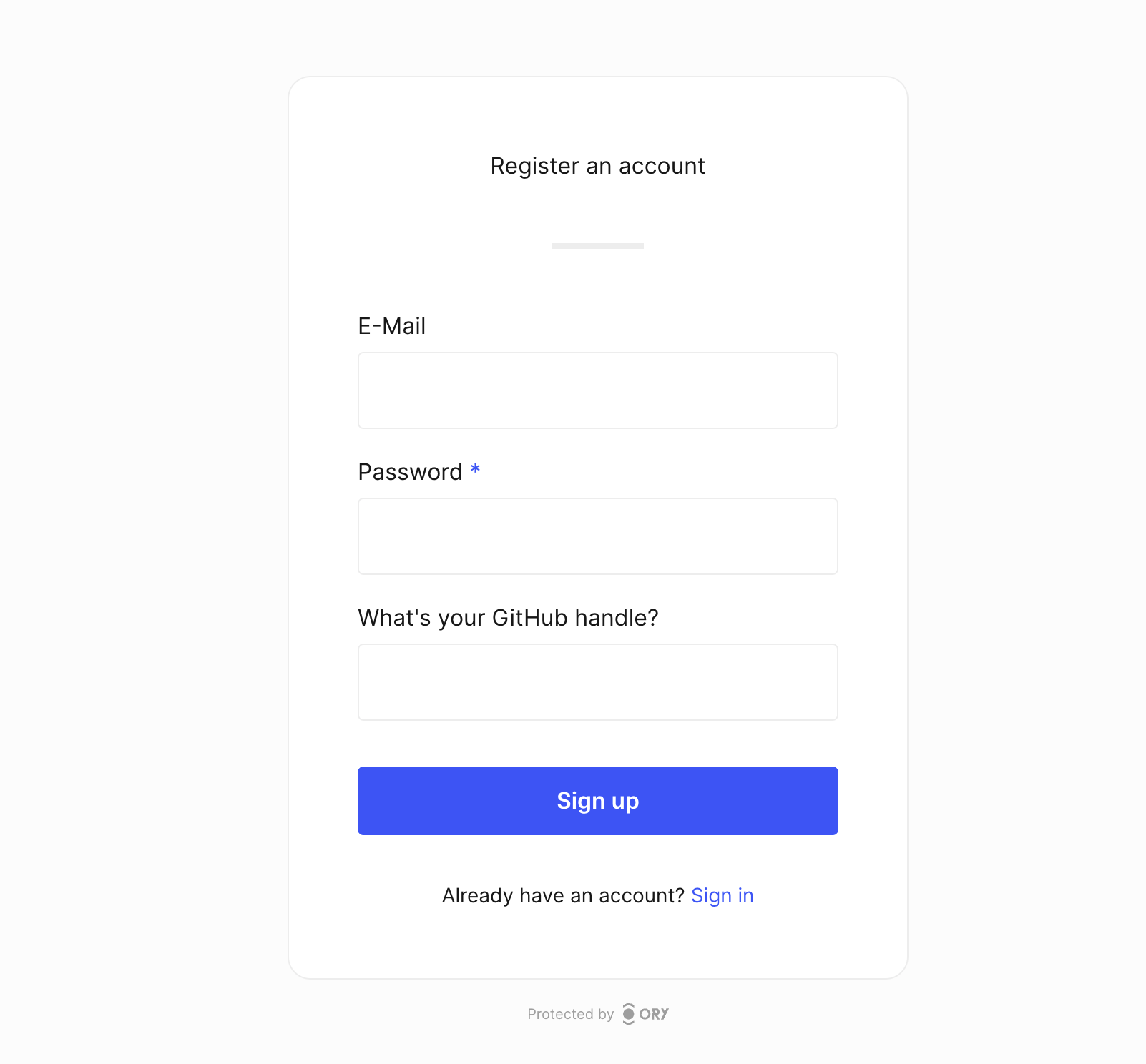
The title property defines the description of the field rendered in the UI. This schema has a field which asks users to provide
their GitHub handle, which is clear thanks to the field description defined in the title property.
- Identity schema
- Generated UI
{
  "$id": "https://schemas.ory.sh/presets/kratos/identity.basic.schema.json",
  "title": "Person",
  "type": "object",
  "properties": {
    "traits": {
      "type": "object",
      "properties": {
        "email": {
          "type": "string",
          "format": "email",
          "title": "Email",
          "ory.sh/kratos": {
            "credentials": {
              "password": {
                "identifier": true
              }
            },
            "recovery": {
              "via": "email"
            },
            "verification": {
              "via": "email"
            }
          }
        },
        "name": {
          "type": "string",
          "title": "What's your GitHub handle?"
        }
      }
    }
  },
  "required": [
    "email"
  ],
  "additionalProperties": false
}
Restrict values with enum
Use the JSON Schema enum keyword to restrict a trait to a fixed set of allowed values. When you declare an enum on a string
property, the Ory Account Experience renders the field as a dropdown (a native <select>) and only accepts values from the list
at registration, settings, and admin updates.
{
  "$schema": "http://json-schema.org/draft-07/schema#",
  "type": "object",
  "properties": {
    "traits": {
      "type": "object",
      "properties": {
        "country": {
          "type": "string",
          "title": "Country",
          "enum": ["US", "UK", "DE", "AT"]
        }
      },
      "required": ["country"]
    }
  }
}
Ory Kratos surfaces the allowed values on the UI node by attaching an options array to the input attributes. Custom UIs that
already know how to render a UI node can read attributes.options and display a <select>; UIs that do not look at options
fall back to a plain text input, so the change is backward compatible with older custom UIs.
Only top-level string properties under traits are supported. The rendered option value is used as both the submitted value and
the visible label.
Identity schema extensions
Because the system doesn't know which fields have system-relevant meaning, you have to specify that in the schema. For example:
- This email address should be used for recovering a lost password.
- This identifier (username or email) should be used for logging in with a password.
- This is the phone number used for SMS 2FA.
The vocabulary extension can be used within a property. Let's take a look at the email identity schema preset. It uses all available identity schema extensions:
{
  "$id": "https://schemas.ory.sh/presets/kratos/identity.email.schema.json",
  "title": "Person",
  "type": "object",
  "properties": {
    "traits": {
      "type": "object",
      "properties": {
        "email": {
          "type": "string",
          "format": "email",
          "title": "E-Mail",
          "ory.sh/kratos": {
            "credentials": {
              "password": {
                "identifier": true
              },
              "webauthn": {
                "identifier": true
              },
              "totp": {
                "account_name": true
              },
              "code": {
                "identifier": true,
                "via": "email"
              },
              "passkey": {
                "display_name": true
              }
            },
            "recovery": {
              "via": "email"
            },
            "verification": {
              "via": "email"
            }
          },
          "maxLength": 320
        },
        "phone": {
          "type": "string",
          "format": "tel",
          "title": "Phone number",
          "ory.sh/kratos": {
            "credentials": {
              "password": {
                "identifier": true
              },
              "code": {
                "identifier": true,
                "via": "sms"
              }
            },
            "recovery": {
              "via": "sms"
            },
            "verification": {
              "via": "sms"
            }
          },
          "maxLength": 320
        }
      },
      "required": ["email"],
      "additionalProperties": false
    }
  }
}
Multiple identifiers
It is possible to have multiple identifiers. For example, you could have a username and an email address that the user can use to sign in:
{
  "$id": "https://schemas.ory.sh/presets/kratos/identity.email.schema.json",
  "title": "Person",
  "type": "object",
  "properties": {
    "traits": {
      "type": "object",
      "properties": {
        "username": {
          "type": "string",
          "minLength": 6,
          "title": "Username",
          "ory.sh/kratos": {
            "credentials": {
              "password": {
                "identifier": true
              }
            }
          }
        },
        "email": {
          "type": "string",
          "format": "email",
          "title": "E-Mail",
          "ory.sh/kratos": {
            "credentials": {
              "password": {
                "identifier": true
              },
              "webauthn": {
                "identifier": true
              },
              "totp": {
                "account_name": true
              },
              "code": {
                "identifier": true,
                "via": "email"
              },
              "passkey": {
                "display_name": true
              }
            },
            "recovery": {
              "via": "email"
            },
            "verification": {
              "via": "email"
            }
          },
          "maxLength": 320
        }
      },
      "required": ["email"],
      "additionalProperties": false
    }
  }
}
You can also specify an array of elements:
{
  "$id": "https://schemas.ory.sh/presets/kratos/identity.email.schema.json",
  "title": "Person",
  "type": "object",
  "properties": {
    "traits": {
      "type": "object",
      "properties": {
        "emails": {
          "type": "array",
          "items": [
            {
              "type": "string",
              "format": "email",
              "title": "E-Mail",
              "ory.sh/kratos": {
                "credentials": {
                  "password": {
                    "identifier": true
                  },
                  "webauthn": {
                    "identifier": true
                  },
                  "totp": {
                    "account_name": true
                  },
                  "passkey": {
                    "display_name": true
                  },
                  "code": {
                    "identifier": true,
                    "via": "email"
                  }
                },
                "recovery": {
                  "via": "email"
                },
                "verification": {
                  "via": "email"
                }
              },
              "maxLength": 320
            }
          ]
        }
      },
      "required": ["email"],
      "additionalProperties": false
    }
  }
}
Password login identifier
You can configure Ory Identities to use specific fields as the identity's identifier. In this example, the password is set as
the identifier:
{
  "ory.sh/kratos": {
    "credentials": {
      "password": {
        "identifier": true
      }
    }
  }
}
Email
Let's assume the identity's traits are
traits:
# These are just examples
name:
first: Aeneas
last: Rekkas
favorite_animal: Dog
accepted_tos: true
and we are using a JSON Schema that uses the email field as the identifier for the password flow:
{
  "$id": "http://mydomain.com/schemas/v2/customer.schema.json",
  "$schema": "http://json-schema.org/draft-07/schema#",
  "title": "A customer (v2)",
  "type": "object",
  "properties": {
    "traits": {
      "type": "object",
      "properties": {
        "email": {
          "title": "E-Mail",
          "type": "string",
          "format": "email",

          // This tells Ory Identities that the field should be used as the "username" for the username and password flow.
          "ory.sh/kratos": {
            "credentials": {
              "password": {
                "identifier": true
              }
            }
          }
        },
        "name": {
          "type": "object",
          "properties": {
            "first": {
              "title": "First Name",
              "type": "string"
            },
            "last": {
              "title": "Last Name",
              "type": "string"
            }
          }
        },
        "favorite_animal": {
          "title": "Favourite Animal",
          "type": "string"
        },
        "accepted_tos": {
          "title": "Terms of Service",
          "type": "boolean"
        }
      },
      "required": ["email"],
      "additionalProperties": false
    }
  }
}
In this example, Ory understands that traits.email='[email protected]' is the identifier for this identity. The system must get
[email protected] and a password to sign in an user.
Username and Password Credentials contains more information and examples about credentials usage.
Note that the format field of the identity schema will perform validation of the given trait. In this example, the email address
is validated using the JSON Schema rule
set.
Email validation rules
When you use "format": "email", Ory validates the email address against
RFC 5322, section 3.4.1 and the domain part against
RFC 1034, section 3.1 and
RFC 1123, section 2.1.
The following rules are enforced:
- The total address length must not exceed 254 characters.
- The address must contain an
@separator. - The local part (before
@) must not exceed 64 characters. - The domain part (after
@) must be a valid hostname:- Only ASCII letters (
a-z,A-Z), digits (0-9), and hyphens (-) are allowed. - Each label must be 1–63 characters long.
- Labels must not start or end with a hyphen.
- The total hostname length must not exceed 253 characters.
- Only ASCII letters (
For example, [email protected] is valid because underscores are allowed in the local part. However,
user@domain_name.com is rejected because underscores are not allowed in the domain part.
To customize email validation beyond these rules, you can replace "format": "email" with a "pattern" regex in your identity
schema. Alternatively, you can use a before-registration webhook to
apply custom validation logic.
Replacing "format": "email" with a custom "pattern" bypasses RFC-compliant validation. This can allow malformed or
undeliverable addresses into your system, which may cause issues with account recovery, email verification, and other flows that
depend on valid email addresses. Only relax validation when you have a clear need and understand the trade-offs.
Phone number
Let's extend the identity schema from the previous chapter with a phone number:
{
  "$id": "http://mydomain.com/schemas/v2/customer.schema.json",
  "$schema": "http://json-schema.org/draft-07/schema#",
  "title": "A customer (v2)",
  "type": "object",
  "properties": {
    "traits": {
      "type": "object",
      "properties": {
        "email": {
          "title": "E-Mail",
          "type": "string",
          "format": "email",

          // This tells Ory Identities that the field should be used as the "username" for the Username and Password Flow.
          "ory.sh/kratos": {
            "credentials": {
              "password": {
                "identifier": true
              }
            }
          }
        },
        "phone": {
          "title": "Phone",
          "type": "string",
          "format": "tel",

          // The phone number is marked as an identifier. This allows the user to log in with both email and phone number.
          "ory.sh/kratos": {
            "credentials": {
              "password": {
                "identifier": true
              }
            }
          }
        },
        "name": {
          "type": "object",
          "properties": {
            "first": {
              "title": "First Name",
              "type": "string"
            },
            "last": {
              "title": "Last Name",
              "type": "string"
            }
          }
        },
        "favorite_animal": {
          "title": "Favourite Animal",
          "type": "string"
        },
        "accepted_tos": {
          "title": "Terms of Service",
          "type": "boolean"
        }
      },
      "required": ["email"],
      "additionalProperties": false
    }
  }
}
By using the "format": "tel" field we enable validation of phone numbers using the Golang
port of Google's libphonenumber.
Using the following identity schema extension we specify that the field is used as the "ID" when signing in using a password:
{
  "ory.sh/kratos": {
    "credentials": {
      "password": {
        "identifier": true
      }
    }
  }
}
Passkey display name
Using the following identity schema extension we specify that the field is used as the display name for PassKeys:
{
  "ory.sh/kratos": {
    "credentials": {
      "passkey": {
        "display_name": true
      }
    }
  }
}
Passwordless one-time code login identifier
Using the following identity schema extension we specify that the field is used as the "ID" when using passwordless one-time code login:
- SMS
{
  "ory.sh/kratos": {
    "credentials": {
      "code": {
        "identifier": true,
        "via": "email",
      }
    }
  }
}
{
  "ory.sh/kratos": {
    "credentials": {
      "code": {
        "identifier": true,
        "via": "sms",
      }
    }
  }
}
Google Authenticator (TOTP) display name
The following identity schema extension specifies that this field should be displayed in the Authenticator App as the account name:
{
  "ory.sh/kratos": {
    "credentials": {
      "totp": {
        "account_name": true
      }
    }
  }
}
Passwordless WebAuthn login identifier
Please use the PassKey method instead. This is documented for legacy reasons.
Using the following identity schema extension we specify that the field is used as the "ID" when using passwordless WebAuthn login:
{
  "ory.sh/kratos": {
    "credentials": {
      "webauthn": {
        "identifier": true
      }
    }
  }
}
Verification address
Specifies that the field is verifiable by sending an email with a verification code or link.
- SMS
{
  "ory.sh/kratos": {
    "verification": {
      "via": "email"
    }
  }
}
{
  "ory.sh/kratos": {
    "verification": {
      "via": "sms"
    }
  }
}
Recovery address
Specifies that the field can be used to send an account recovery code or link.
- SMS
{
  "ory.sh/kratos": {
    "recovery": {
      "via": "email"
    }
  }
}
{
  "ory.sh/kratos": {
    "recovery": {
      "via": "sms"
    }
  }
}
Mandatory fields for registration
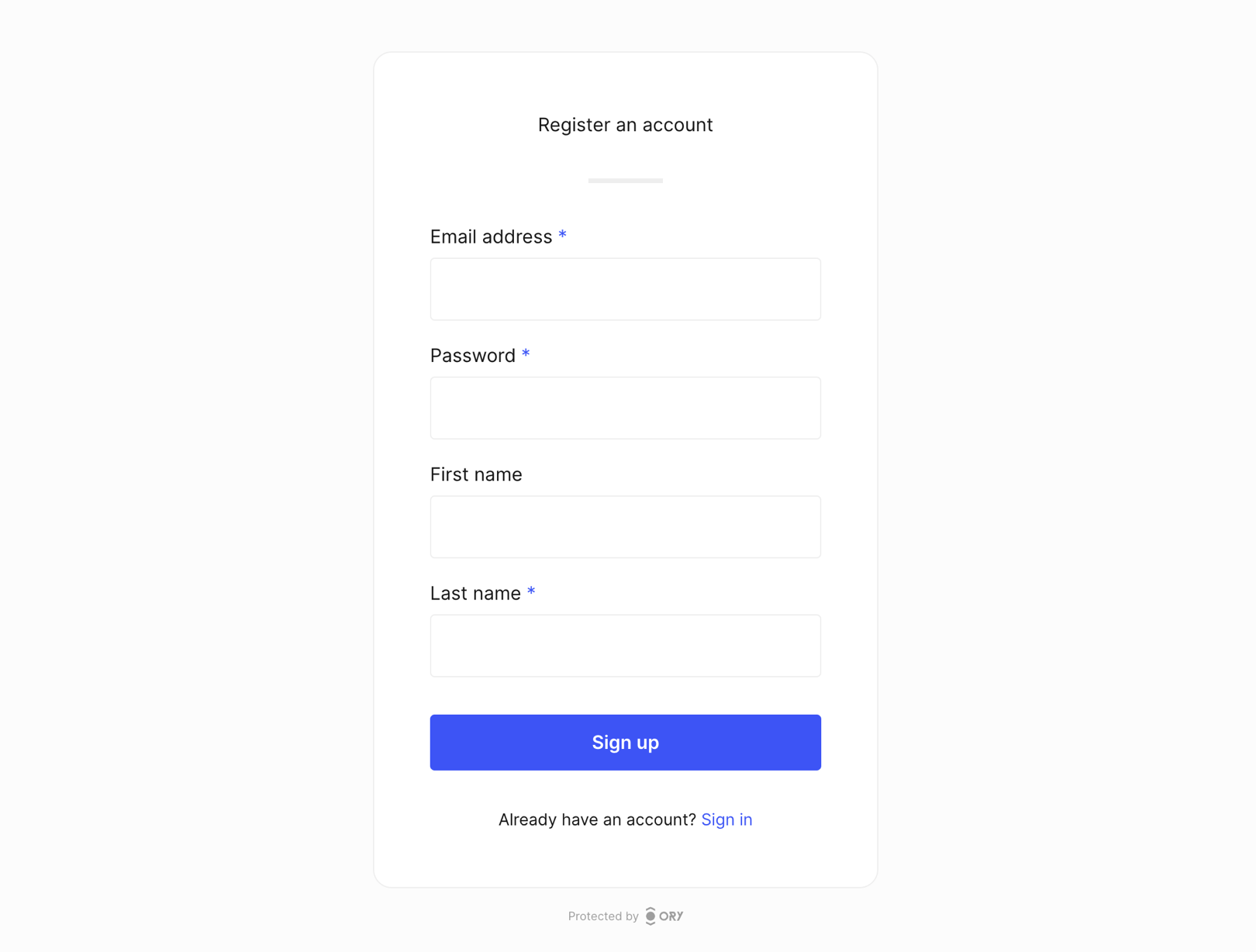
Use required to define which identity schema fields users must fill in during registration. When users try to register without
filling in the mandatory fields, Ory Account Experience shows a message that tells users they must provide the mandatory
information to proceed. Additionally, required fields are marked with an asterisk for easy visual identification.
The sample identity schema has two mandatory fields: email address and last name.
For nested objects such as name, add the required property inside of the object.
- Identity schema
- Generated UI
{
  "$id": "https://schemas.ory.sh/presets/kratos/identity.basic.schema.json",
  "title": "Person",
  "type": "object",
  "properties": {
    "traits": {
      "type": "object",
      "properties": {
        "email": {
          "type": "string",
          "format": "email",
          "title": "Email address",
          "ory.sh/kratos": {
            "credentials": {
              "password": {
                "identifier": true
              },
              "webauthn": {
                "identifier": true
              },
              "totp": {
                "account_name": true
              },
              "code": {
                "identifier": true,
                "via": "email"
              },
              "passkey": {
                "display_name": true
              }
            },
            "recovery": {
              "via": "email"
            },
            "verification": {
              "via": "email"
            }
          },
          "maxLength": 320
        },
        "name": {
          "type": "object",
          "required": [
            "last"
          ],
          "properties": {
            "first": {
              "type": "string",
              "title": "First name",
              "maxLength": 256
            },
            "last": {
              "type": "string",
              "title": "Last name",
              "maxLength": 256
            }
          }
        }
      },
      "required": [
        "email"
      ],
      "additionalProperties": false
    }
  }
}
More advanced validation
Json schemas are a powerful tool to even do conditional validation.
For example, when a user opts in to receiving security updates it is required to have their phone number as well.
You can read more about using the definitions and dependencies keywords in the JSON schema
structuring a complex schema and
conditional subschemas.
If you split a schema across multiple files with "$ref": "file:///path/to/fragment.json", list each referenced file under
security.landlock.allowed_paths so the Landlock filesystem sandbox does not
block the read. Only the top-level identity.schemas[].url entries are auto-allowed.
Below is an example of how to do this:
{
  "$id": "https://schemas.ory.sh/presets/kratos/identity.email.schema.json",
  "title": "Person",
  "type": "object",
  "definitions": {
    "phone": {
      "type": "string",
      "format": "tel",
      "title": "Phone Number"
    },
    "optIn": {
      "type": "boolean",
      "title": "Get security related notifications"
    }
  },
  "properties": {
    "traits": {
      "type": "object",
      "properties": {
        "username": {
          "type": "string",
          "title": "Username",
          "minLength": 6,
          "maxLength": 32,
          "ory.sh/kratos": {
            "credentials": {
              "password": {
                "identifier": true
              },
              "webauthn": {
                "identifier": true
              },
              "totp": {
                "account_name": true
              },
              "passkey": {
                "display_name": true
              }
            }
          }
        },
        "email": {
          "type": "string",
          "format": "email",
          "title": "E-Mail",
          "ory.sh/kratos": {
            "credentials": {
              "password": {
                "identifier": true
              },
              "webauthn": {
                "identifier": true
              },
              "totp": {
                "account_name": true
              },
              "code": {
                "identifier": true,
                "via": "email"
              },
              "passkey": {
                "display_name": true
              }
            },
            "recovery": {
              "via": "email"
            },
            "verification": {
              "via": "email"
            }
          },
          "maxLength": 320
        },
        "phone": {
          "$ref": "#/definitions/phone"
        },
        "optIn": {
          "$ref": "#/definitions/optIn"
        }
      },
      "required": [
        "email",
        "username",
      ],
      "additionalProperties": false,
      "dependencies": {
        "optIn": {
          "properties": {
            "phone": {
              "$ref": "#/definitions/phone"
            }
          },
          "required": [
            "phone"
          ]
        },
        "phone": {
          "properties": {
            "optIn": {
              "$ref": "#/definitions/optIn"
            }
          },
          "required": [
            "optIn"
          ]
        }
      }
    }
  }
}
Identity schema resource limits
Each schema document has a budget of 512 $ref keywords and 128 $id keywords. These budgets apply separately to the configured
document and each document loaded through a $ref, including nested references. A reference to a fragment within the same
document counts toward that document's $ref budget.
Each document also has a nesting budget of 256 levels. The root object counts as level 1; each nested object or array adds one level, including containers in custom metadata.
The configured document has a hard size limit of 1 MiB (1,048,576 bytes). Documents loaded through $ref have the same size
budget, controlled by the guard enforcement setting.
The compiled reference graph is also checked for cycles that do not consume input. References through properties, items, or
other keywords that descend into the value can recurse. Cycles made only of same-value references and conditional branches produce
a guard finding. Graph inspection reports traversal beyond 1,024 compiled subschemas. This threshold follows the guard mode:
report-only mode records the finding and allows the schema to load; enforcement rejects it. Compiled subschema traversal levels
are separate from JSON container nesting.
For self-hosted Kratos, feature_flags.enforce_identity_schema_guards controls these budgets:
false(default): Exceeding a keyword, nesting, or referenced document size budget produces a warning and a trace attribute. The schema can still load if it passes the other schema checks.true: Exceeding any budget rejects the schema as a configuration error.
The configured document's size limit and security.disallow_ref_in_identity_schemas apply in both modes.
To investigate a warning, check the identity_schema_guard and identity_schema_guard_finding log fields. The
identity_schema_resource field identifies the resource with a stable hash of its URL. Trace attributes use
identity_schema.guard.occurrence_budget, identity_schema.guard.nesting_depth, identity_schema.guard.body_size, and
identity_schema.guard.reference_cycle and identity_schema.guard.reference_depth. Each guard's .resource trace attribute
contains the resource's URL hash.
To resolve a finding or rejection, remove unused definitions and references, flatten nested structures, reduce the document's size, or split it into smaller referenced documents where your reference policy allows this. Check each referenced document against the same budgets before enabling enforcement.
Choosing between username, email, and phone number
Before you start, you need to decide what data you want to collect from your users and why. It's hard to change this decision afterwards, so make sure you've taken everything into account.
When logging in, the user will use a login identifier and a password to sign up and in. The identifier can be:
- a username - "john.doe" or "johndoe123" or "oryuser"
- an email address -
[email protected] - a phone number -
+49-1234-4321-1234-4321
All of these approaches have up- and downsides.
Using the email address as the login identifier is easy to remember, doesn't require additional fields (because the email address is already being collected), and is usually unique. It's usually unique because sometimes companies use a "shared" email account (for example [email protected]) to access services. In that case, multiple real identities are using the same email identifier to log in.
The email address however represents a unique identifier and personally identifiable information (PII). An attacker could for
example check if the email address [email protected] is registered at for example an adult website and use that information for
blackmail.
The same considerations apply to using a phone number as the primary registration & login identifier.
Using a free text username reduces the privacy risk because it's much harder to make a connection between the username and a real world identity. It's still possible in cases where users choose a username such as "john.doe.from.newyork.1970", but finding the right username identifier is still difficult and there is plausible deniability because anyone could use that username.
A free text username however requires capturing additional fields (for example an email address for password resets / account
recovery) and is hard to remember. It's often very difficult to find unique usernames as people tend to use a combination of their
names and initials such as john.doe which has a high chance of collision. Therefore, one ends up with usernames such as
john.doe1234432.
It's important to understand that Ory Identities lowercases all password identifiers and therefore email addresses. Characters
+ or . which have special meaning for some email providers such as Gmail aren't normalized:
userNAMEis equal tousername[email protected]is equal to[email protected][email protected]is NOT equal to[email protected][email protected]is NOT equal to[email protected]
You need to decide which route you want to take.
Examples
Let's take a look at some examples!
Email as the primary identifier
To use the email address as the login identifier, define the following identity schema:
{
  "$id": "https://example.com/registration.schema.json",
  "$schema": "http://json-schema.org/draft-07/schema#",
  "title": "Person",
  "type": "object",
  "properties": {
    "traits": {
      "type": "object",
      "properties": {
        "email": {
          "type": "string",
          "format": "email",
          "title": "E-Mail",
          "ory.sh/kratos": {
            "credentials": {
              "password": {
                "identifier": true
              },
              "webauthn": {
                "identifier": true
              },
              "totp": {
                "account_name": true
              },
              "code": {
                "identifier": true,
                "via": "email"
              },
              "passkey": {
                "display_name": true
              }
            },
            "recovery": {
              "via": "email"
            },
            "verification": {
              "via": "email"
            }
          },
          "maxLength": 320
        }
      }
    }
  }
}
Multiple emails and password
You can allow users to sign up with multiple email addresses and use any of them to log in:
{
  "$id": "https://example.com/registration.schema.json",
  "$schema": "http://json-schema.org/draft-07/schema#",
  "title": "Person",
  "type": "object",
  "properties": {
    "traits": {
      "type": "object",
      "properties": {
        "emails": {
          "type": "array",
          "items": {
            "type": "string",
            "format": "email",
            "ory.sh/kratos": {
              "credentials": {
                "password": {
                  "identifier": true
                },
                "webauthn": {
                  "identifier": true
                },
                "totp": {
                  "account_name": true
                },
                "code": {
                  "identifier": true,
                  "via": "email"
                },
                "passkey": {
                  "display_name": true
                }
              },
              "recovery": {
                "via": "email"
              },
              "verification": {
                "via": "email"
              }
            }
          }
        }
      }
    }
  }
}
Username and password
To use a username as the login identifier, define the following identity schema:
{
  "$id": "https://example.com/registration.schema.json",
  "$schema": "http://json-schema.org/draft-07/schema#",
  "title": "Person",
  "type": "object",
  "properties": {
    "traits": {
      "type": "object",
      "properties": {
        "username": {
          "type": "string",
          "ory.sh/kratos": {
             "credentials": {
               "password": {
                 "identifier": true
               },
               "webauthn": {
                 "identifier": true
               },
               "totp": {
                 "account_name": true
               },
                "passkey": {
                  "display_name": true
                }
              }
            }
          }
        }
      }
    }
  }
}
Username and email and password
You may also mix usernames and passwords:
{
  "$id": "https://example.com/registration.schema.json",
  "$schema": "http://json-schema.org/draft-07/schema#",
  "title": "Person",
  "type": "object",
  "properties": {
    "traits": {
      "type": "object",
      "properties": {
        "email": {
          "type": "string",
          "format": "email",
          "ory.sh/kratos": {
            "credentials": {
              "password": {
                "identifier": true
              },
              "webauthn": {
                "identifier": true
              },
              "totp": {
                "account_name": true
              },
              "code": {
                "identifier": true,
                "via": "email"
              },
              "passkey": {
                "display_name": true
              }
            },
            "recovery": {
              "via": "email"
            },
            "verification": {
              "via": "email"
            }
          }
        },
        "username": {
          "type": "string",
          "ory.sh/kratos": {
            "credentials": {
              "password": {
                "identifier": true
              },
              "webauthn": {
                "identifier": true
              },
              "totp": {
                "account_name": true
              },
              "code": {
                "identifier": true,
                "via": "email"
              },
              "passkey": {
                "display_name": true
              }
            }
          }
        }
      }
    }
  }
}
Phone number and password
{
  "$id": "https://example.com/registration.schema.json",
  "$schema": "http://json-schema.org/draft-07/schema#",
  "title": "Person",
  "type": "object",
  "properties": {
    "traits": {
      "type": "object",
      "properties": {
        "phone": {
          "type": "string",
          "format": "tel",
          "ory.sh/kratos": {
            "credentials": {
              "password": {
                "identifier": true
              },
              "webauthn": {
                "identifier": true
              },
              "totp": {
                "account_name": true
              },
               "code": {
                 "identifier": true,
                 "via": "sms"
               },
               "passkey": {
                 "display_name": true
               }
             },
             "recovery": {
              "via": "sms"
            },
            "verification": {
              "via": "sms"
            }
            }
          }
        }
      }
    }
  }
}
Advanced schema
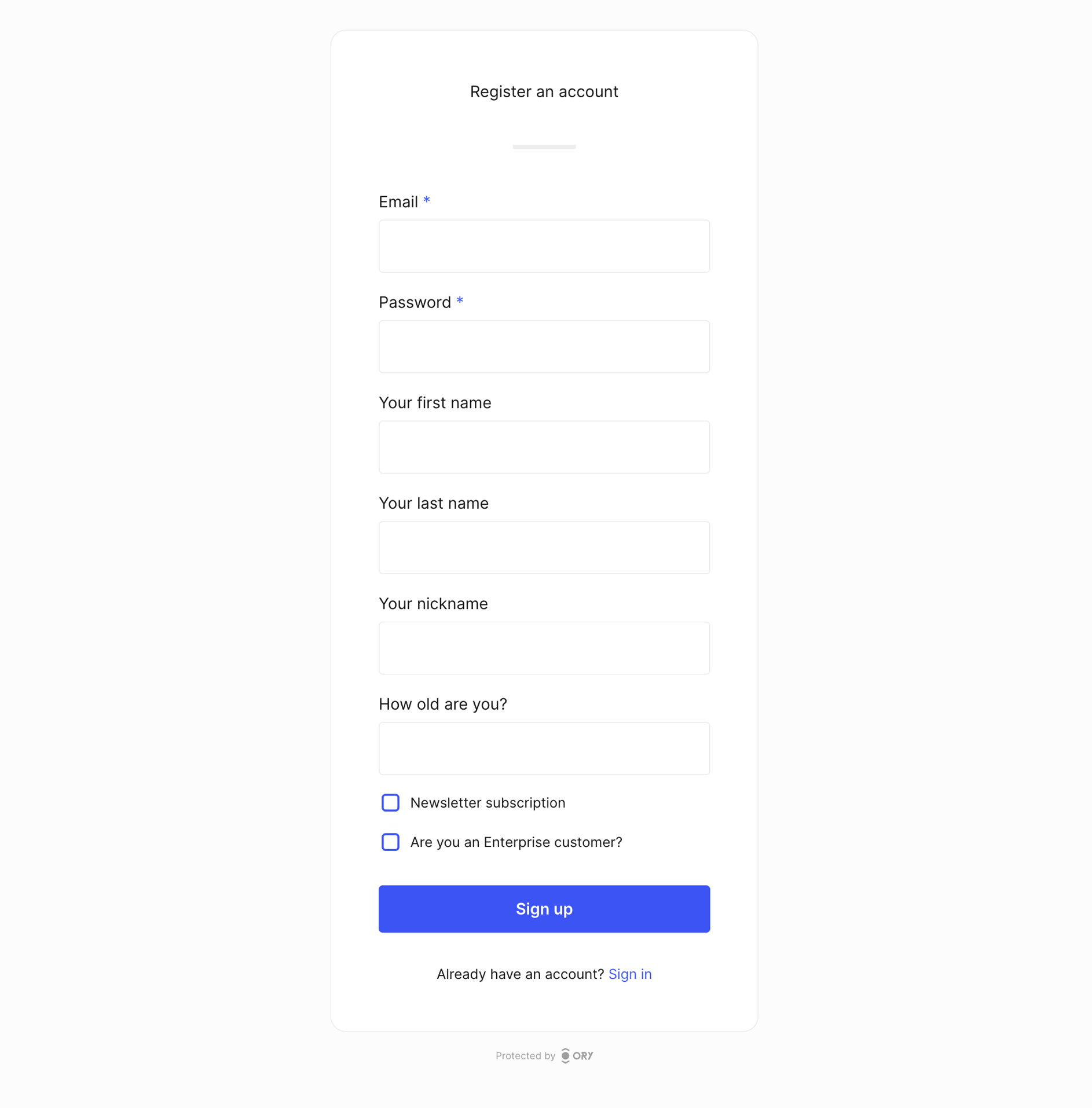
The following identity schema defines personal fields for first name, last name, nickname, and age, and includes two checkboxes:
one required for accepting the terms of service and one optional for newsletter subscription.
To render links in a checkbox label, use markdown link syntax. Links open in a new tab.
To make a checkbox required, add "const": true to the property definition. This differs from text fields, which use the required
array.
- Identity schema
- Generated UI
{
  "$id": "https://schemas.ory.sh/presets/kratos/identity.basic.schema.json",
  "title": "Person",
  "type": "object",
  "properties": {
    "traits": {
      "type": "object",
      "properties": {
        "email": {
          "type": "string",
          "format": "email",
          "title": "Email",
          "ory.sh/kratos": {
            "credentials": {
              "password": {
                "identifier": true
              },
              "webauthn": {
                "identifier": true
              },
              "totp": {
                "account_name": true
              },
              "code": {
                "identifier": true,
                "via": "email"
              },
              "passkey": {
                "display_name": true
              }
            },
            "recovery": {
              "via": "email"
            },
            "verification": {
              "via": "email"
            }
          }
        },
        "name": {
          "type": "object",
          "properties": {
            "first": {
              "type": "string",
              "title": "Your first name"
            },
            "last": {
              "type": "string",
              "title": "Your last name"
            },
            "nickname": {
              "type": "string",
              "title": "Your nickname"
            }
          }
        },
        "age": {
          "type": "integer",
          "title": "How old are you?"
        },
        "tos": {
          "type": "boolean",
          "title": "I accept the [terms of service](https://example.com/tos)",
          "const": true
        },
        "newsletter": {
          "type": "boolean",
            "title": "I want to sign up for the newsletter"
        },
      },
      "required": [
        "email"
      ],
      "additionalProperties": false
    }
  }
}
Additional properties
Keep your identities clean by denying
additionalProperties:
{
  properties: {
    traits: {
      type: "object",
      properties: {
        // ...
      },
      additionalProperties: false,
    },
  },
}