Ory + MCP: How to secure your MCP servers with OAuth2.1
Learn how to implement secure MCP servers with Ory and OAuth 2.1 in this step-by-step guide. Protect your AI agents against unauthorized access while enabling standardized interactions.
Agentic commerce is here, but authorization isn't. How AI platforms rushing to integrate with major brands are creating a systemic identity security crisis.
Enterprises are adopting departmental LLMs just like they deploy ERP, HRIS, and CRM systems. Learn why AI segmentation is essential and how to manage access control for humans and autonomous agents.
Learn how to integrate Ory Hydra, a powerful and fully open-source OAuth 2.1 server, with the Model Context Protocol (MCP) to create secure, standardized AI agent interactions.
As AI agents evolve, the Model Context Protocol (MCP) has emerged as a standard gaining significant attention.
It boils down to a protocol that standardizes on how an application provides context to LLMs or AI Agents to access its services. For example, let's say you run a web application that provides real time weather data, you could add a MCP server to your web application that allows AI Agents and LLMs to call your service for that real time weather data in a standardized way that speaks the language of these LLMs and AI Agents.
While Model Context Protocol (MCP) functions similarly to OpenAPI specifications (i.e. enabling applications to interact with AI agents), security concerns quickly emerge. Unrestricted AI agent access presents clear risk when your service contains sensitive data or can perform critical operations like transactions or deletions.
Fortunately, MCP addresses this through OAuth 2.1 authorization protocols, which will be the focus of this guide. Whether you're developing internal tools, creating system integrations, or simply exploring emerging protocols, this walkthrough provides the essential knowledge to implement secure AI agent interactions.
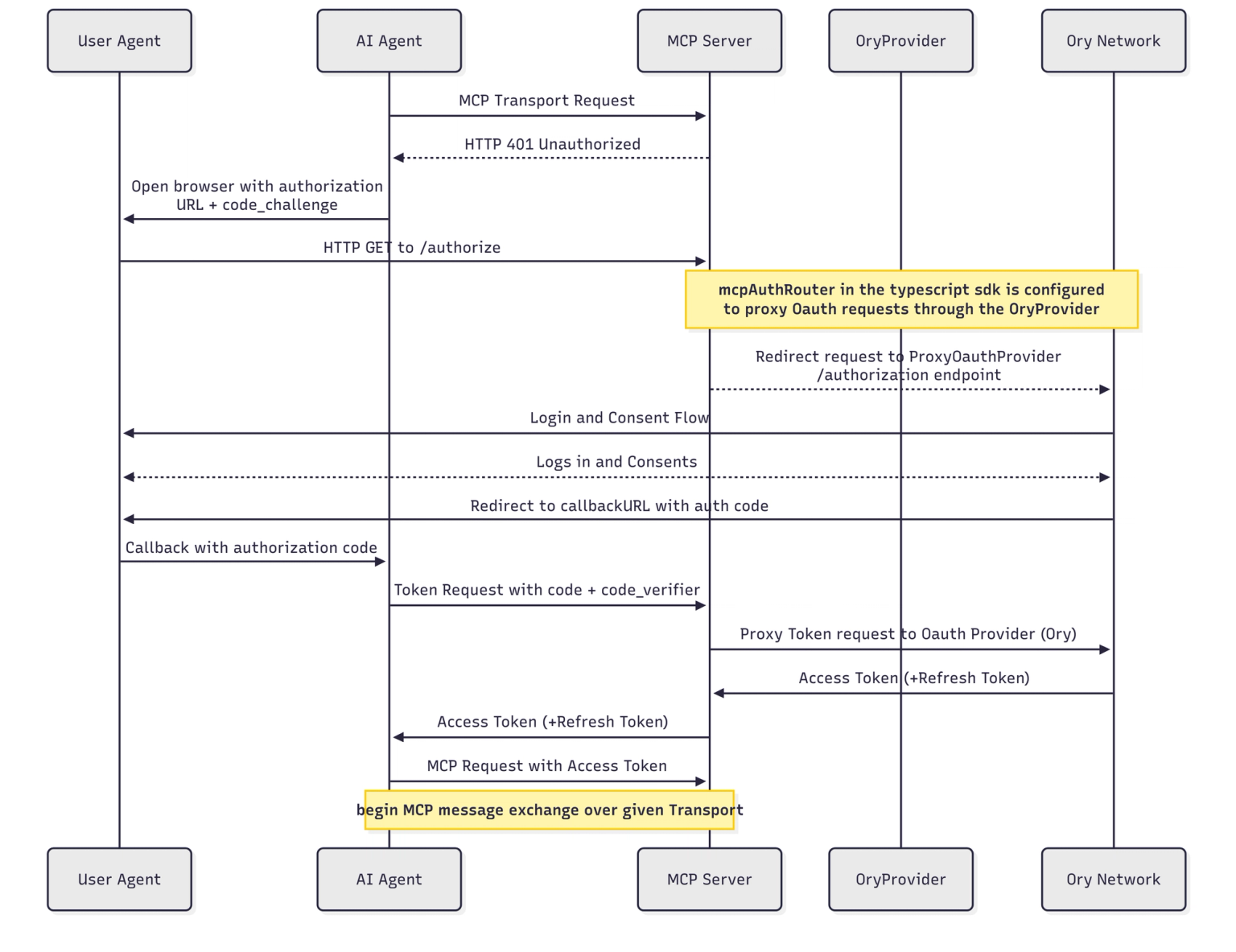
For reference, the overall first time authentication through MCP with OAuth follows the flow outlined in the sequence diagram below:
Initial authentication through MCP with OAuth
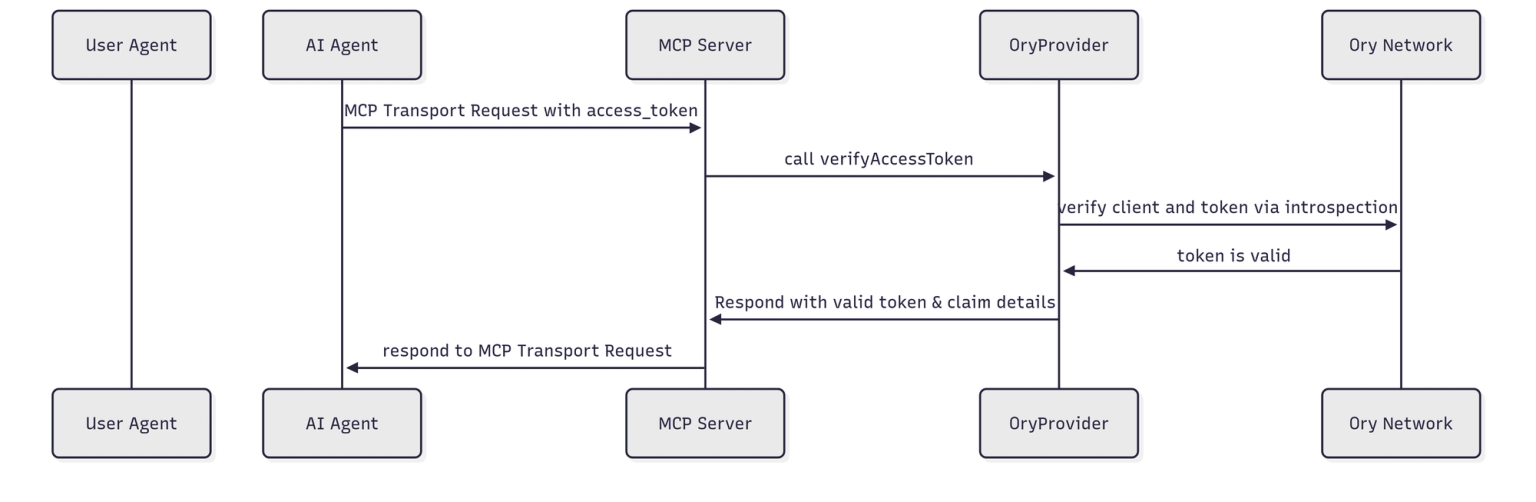
Additionally, subsequent authentications of the AI Agent with a valid access_token is outlined in the following sequence diagram:
Subsequent authentications of the AI Agent
Note: At the time of publishing this blog (May 27, 2025), the MCP protocol and SDKs have changed multiple times. We will make every effort to keep up to date with the latest changes, but please expect some shifts until the next major specification release.
Implementing MCP with Ory OAuth
We've simplified the implementation process with two dedicated repositories:
A reusable OAuth provider for MCP that integrates with Ory
NOTE: Don’t use Ory Network and want to Self-Host Ory Hydra OSS? We have you covered! The @ory/mcp-oauth-provider supports Hydra as well with a simple configuration flag!
From the example, we start by setting up a few environmental variables that we need:
config();
// Get the config from the environment variablesconst oryProjectUrl = process.env.ORY_PROJECT_URL;
const oryProjectApiKey = process.env.ORY_PROJECT_API_KEY;
if (!oryProjectUrl || !oryProjectApiKey) {
thrownewError('ORY_PROJECT_URL and ORY_PROJECT_API_KEY must be set');
}
const mcpBaseUrl = process.env.MCP_BASE_URL;
if (!mcpBaseUrl) {
thrownewError('MCP_BASE_URL must be set');
}
const serviceDocumentationUrl = process.env.SERVICE_DOCUMENTATION_URL;
if (!serviceDocumentationUrl) {
thrownewError('SERVICE_DOCUMENTATION_URL must be set');
}
Next up, we set up the MCP server object. We'll define the tool it will expose to any authenticated AI Agent, keeping it simple by just exposing the Get Project API from Ory for this example:
constgetServer = () => {
const server = newMcpServer(
{
name: 'ory-mpc-example',
version: '1.0.0',
description: 'This is an example MPC server that uses Ory for authentication.',
},
{ capabilities: { logging: {} } }
);
// Get Project Tool
server.tool(
'getProject',
'Get a project by ID for a given Ory Network workspace',
{
projectId: z.string(),
},
async ({ projectId }) => {
try {
const response = await projectApi.getProject({
projectId: projectId,
});
return {
content: [
{
type: 'text',
text: JSON.stringify(response, null, 2),
},
],
};
} catch (error) {
return {
content: [
{
type: 'text',
text: `Error getting project: ${error}`,
},
],
};
}
}
);
return server;
};
Now we create the Express server, the Ory OAuth Provider, and the router for Express to use the router. MCP uses Express in most of its examples for the Streamable HTTP protocol as well as the deprecated Server-Sent Events (SSE) handling.
It is important to note that the above is the bearerAuthMiddleware which just wraps the requireBearerAuth object to make writing the Express route handlers easier. If you don’t include this in your Express route handlers, your routes will be unprotected!
app.post('/mcp', bearerAuthMiddleware, async (req: Request, res: Response) => {
const server = getServer();
try {
consttransport: StreamableHTTPServerTransport = newStreamableHTTPServerTransport({
sessionIdGenerator: undefined,
});
await server.connect(transport);
await transport.handleRequest(req, res, req.body);
res.on('close', () => {
console.log('Request closed');
transport.close();
server.close();
});
} catch (error) {
console.error('Error handling MCP request:', error);
if (!res.headersSent) {
res.status(500).json({
jsonrpc: '2.0',
error: {
code: -32603,
message: 'Internal server error',
},
id: null,
});
}
}
});
app.get('/mcp', bearerAuthMiddleware, async (req: Request, res: Response) => {
console.log('Received GET MCP request');
res.writeHead(405).end(
JSON.stringify({
jsonrpc: '2.0',
error: {
code: -32000,
message: 'Method not allowed.',
},
id: null,
})
);
});
app.delete('/mcp', bearerAuthMiddleware, async (req: Request, res: Response) => {
console.log('Received DELETE MCP request');
res.writeHead(405).end(
JSON.stringify({
jsonrpc: '2.0',
error: {
code: -32000,
message: 'Method not allowed.',
},
id: null,
})
);
});
//=============================================================================// DEPRECATED HTTP+SSE TRANSPORT (PROTOCOL VERSION 2024-11-05)//=============================================================================
app.get('/sse', bearerAuthMiddleware, async (req: Request, res: Response) => {
console.log('Received GET request to /sse (deprecated SSE transport)');
const transport = newSSEServerTransport('/messages', res);
transports[transport.sessionId] = transport;
res.on('close', () => {
delete transports[transport.sessionId];
});
const server = getServer();
await server.connect(transport);
});
app.post('/messages', bearerAuthMiddleware, async (req: Request, res: Response) => {
const sessionId = req.query.sessionIdas string;
lettransport: SSEServerTransport;
const existingTransport = transports[sessionId];
if (existingTransport instanceofSSEServerTransport) {
// Reuse existing transport
transport = existingTransport;
} else {
// Transport exists but is not a SSEServerTransport (could be StreamableHTTPServerTransport)
res.status(400).json({
jsonrpc: '2.0',
error: {
code: -32000,
message: 'Bad Request: Session exists but uses a different transport protocol',
},
id: null,
});
return;
}
if (transport) {
await transport.handlePostMessage(req, res, req.body);
} else {
res.status(400).send('No transport found for sessionId');
}
});
Lastly, we execute the Express server and handle shutdown events gracefully:
const port = process.env.PORT || 3000;
app.listen(port, () => {
console.log(`Backwards compatible MCP server listening on port ${port}`);
console.log(`
==============================================
SUPPORTED TRANSPORT OPTIONS:
1. Streamable Http (Protocol version: 2025-03-26)
Endpoint: /mcp
Methods: GET, POST, DELETE
Usage:
- Initialize with POST to /mcp
- Establish SSE stream with GET to /mcp
- Send requests with POST to /mcp
- Terminate session with DELETE to /mcp
2. Http + SSE (Protocol version: 2024-11-05)
Endpoints: /sse (GET) and /messages (POST)
Usage:
- Establish SSE stream with GET to /sse
- Send requests with POST to /messages?sessionId=<id>
==============================================
`);
});
// Handle server shutdown
process.on('SIGINT', async () => {
console.log('Shutting down server...');
// Close all active transports to properly clean up resourcesfor (const sessionId in transports) {
try {
console.log(`Closing transport for session ${sessionId}`);
await transports[sessionId].close();
delete transports[sessionId];
} catch (error) {
console.error(`Error closing transport for session ${sessionId}:`, error);
}
}
console.log('Server shutdown complete');
process.exit(0);
});
Step 2: Test with the MCP Inspector
To verify everything is working correctly, we use the MCP Inspector tool:
# Clone the inspector repository
git clone https://github.com/modelcontextprotocol/inspector# Navigate to the inspector directory
cd inspector
Modify the client/src/lib/auth.ts file. Find the clientMetadata() function and add these properties to the return object:
contacts: [],
scope: "ory.admin",
This modification is required due to Ory expecting a non-null object for contacts and initial scope on Dynamic Client Registration.
Click Open Auth Settings and then Quick OAuth Flow to initiate authentication
Securing MCP-enabled Systems: How Ory Hydra Makes AI Agents Safe
At Ory, we've fundamentally designed our systems to address precisely these security challenges. Our modular and composable solution naturally integrates with MCP, transforming how enterprises deploy AI agents. Instead of struggling to build OAuth2 implementations that comply with MCP requirements from scratch, organizations can simply leverage Ory Hydra's battle-tested architecture. We provide a fully standards-compliant authorization server for MCP, ensuring your AI agents are secure digital "citizens" from day one.
What does Ory provide for MCP?
Complete OAuth 2.1 Implementation: Full PKCE verification and proper token handling
MCP-Specific Security Controls: Clear UI patterns distinguishing between user-visible and AI-visible instructions
Cross-Server Protection: Strict boundaries and dataflow controls between MCP servers
Tool and Package Pinning: Prevention of unauthorized changes to tool definitions
Dynamic Permission Scoping: Granular control over what each agent can access
Audit Logging: Complete visibility into every action taken through MCP
Whether you're building customer service agents, content recommendation systems, or advanced data analysis tools, Ory Hydra provides the security foundation for agentic AI systems that keeps your MCP implementations secure, compliant, and scalable.
Ready to secure your MCP infrastructure? Contact our team to learn how Ory Hydra can rapidly transform your Agentic AI security.