Oh, auth! While signing users in and deciding what resources they can access is
crucial, implementing authentication and authorization (which are the two terms
that hide under the "auth" umbrella) is often a major bump in the road that is
the process of developing software.
As a developer, you can probably attest to the fact that implementing auth eats
up a lot of precious time. Ever wondered why that is? In most cases, the main
culprits are information overload and the complicated nature of the topic.
What's the best auth setup to implement? What is the most secure approach? Are
JWT tokens the way to go? What about OAuth2? Cookies? The list of questions goes
on and on.
Coding for great user experience in different stacks is tricky enough on its own
and throwing auth into the mix makes things even harder.
Although we cannot write code or implement auth for you, we can do something
just as impactful and (hopefully) helpful - educate you on authorization and
authentication! With a better understanding of the basic terminology and
important concepts, you'll be able to focus on fleshing out your application's
business logic.
Ready to step up your auth game? Let's start with the basics.
Terminology
It's hard to talk about auth without understanding the basic concepts and
terminology. As our first order of business, let's make sure that we're all on
the same page.
If you've got the basics covered and want to focus on the tech, skip to the
The Modern Stack section.
AuthN & AuthZ, a.k.a. Authorization & Authentication
As mentioned in the opening paragraph, "auth" is an umbrella name used when
talking about authorization and authentication.
When the communication calls for a distinction between these processes, their
names are often shortened to:
- AuthN for authentication
- AuthZ for authorization
Although the names and the way they're abbreviated are very similar, AuthZ and
AuthN are not that hard to distinguish once you realize that they apply to two
different (albeit inherently connected) ideas:
Authentication is the process of verifying that entities (individuals,
devices, or programs) are what they say they are.
Authorization is the process of verifying if that entity is allowed to
access resources or perform operations on specific resources.
To put it simply, authentication is all about performing login/registration in
your application and the management of the identity of your user. Once your
user is logged in and starts interacting with resources, the system performs
authorization to see if the identity can view, edit, or remove the selected
resource.
Think about giving someone access to a spreadsheet in Google docs. You choose
whom you want to allow to acces the document and whether that person can edit
the cells or just view them. To start working on it, the collaborator must first
authenticate by signing in to their account. Upon accessing the file, the system
checks what kind of access has been given to that user and authorizes them to
edit or view the file.
Makes sense, right? If you want to explore this topic further, we highly
recommend reading these Stack Overflow threads:
Sessions
Now that you understand authentication better, let's take a closer look at how
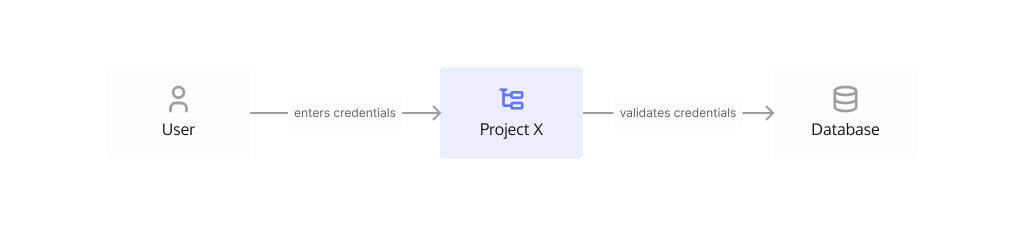
it works. The following diagram shows a typical authentication scenario: the
user signs in by providing their credentials to "Project X" which validates them
with the database.
How do you ensure a great user experience and don't ask users to re-enter their
credentials every time they navigate to a different page or perform a different
action?
This is where sessions come in handy. You probably heard this term before, but
do you know what role it plays in the auth landscape? When you're using
sessions, it means that you created a mechanism that stores information about
the user in the application. In terms of authentication, sessions store
information about a successful login which is a great way to prove that they are
who they say they are, without the need to re-login for every subsequent action
in the app.
What are sessions in technical terms? How's the data stored? Everything depends
on the technology you use and the specific use case, but sessions can be
represented in many different forms and formats, such as URL query params,
cookies, browser local storage, or tokens.
The Modern Stack
In the current software climate, the expectation for every application is that
it's going to support as many device types (Android, iOS, Web, Desktop) as
possible while using a single codebase/framework/programming language. This
makes adding features and maintaining the software much easier and helps
increase user adoption.
As a result, nowadays devs deal with a whole bunch of frameworks which creates a
lot of abstraction. Though frameworks are great and save us a lot of time, it
can turn out that they don't support the underlying requirements of the feature
they were chosen for.
This can be the case with auth, as some technologies aren't clear on how
authentication works with them and how one's supposed to implement auth without
completely butchering the user experience.
To get a better understanding of implementing authentication, let's look at the
different elements at play when working with certain technologies.
Single-page Applications (SPA)
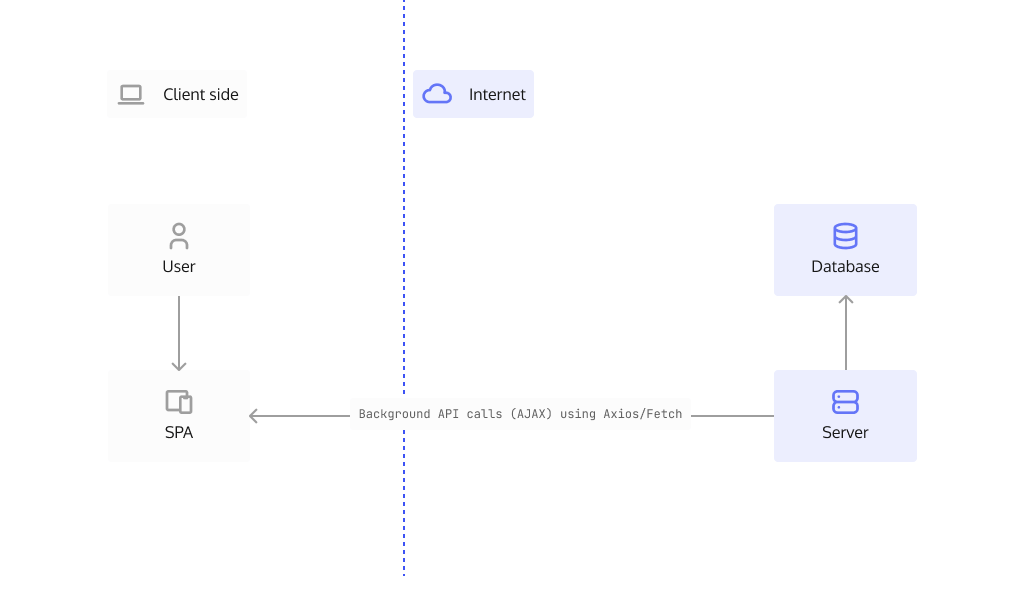
Single-page applications run completely in the user's browser and don't rely on
any interaction with the server to maintain the state of your data. Main
technologies used to create SPAs include HTML, CSS, and JavaScript. Some popular
frameworks include React,
Angular, and VueJs.
Server-side Rendering Applications (SSR)
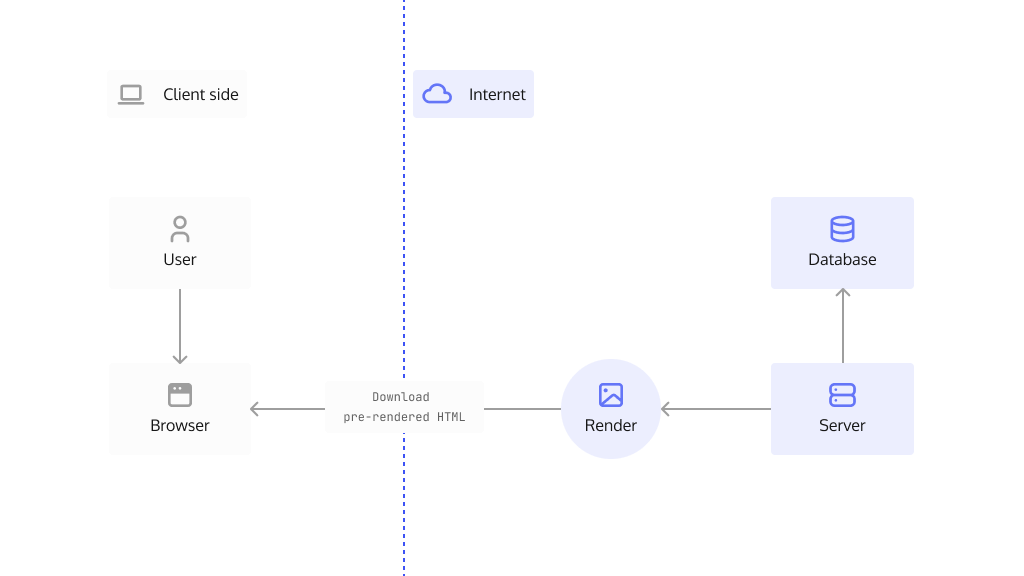
Server-side rendered applications aim to improve load times to guarantee a
snappy user experience. They do so by rendering pages on the server before they
reach the client which takes the burden of downloading JS assets off the
browser's shoulders. Some popular frameworks used for SSR include
NextJs and NuxtJs.
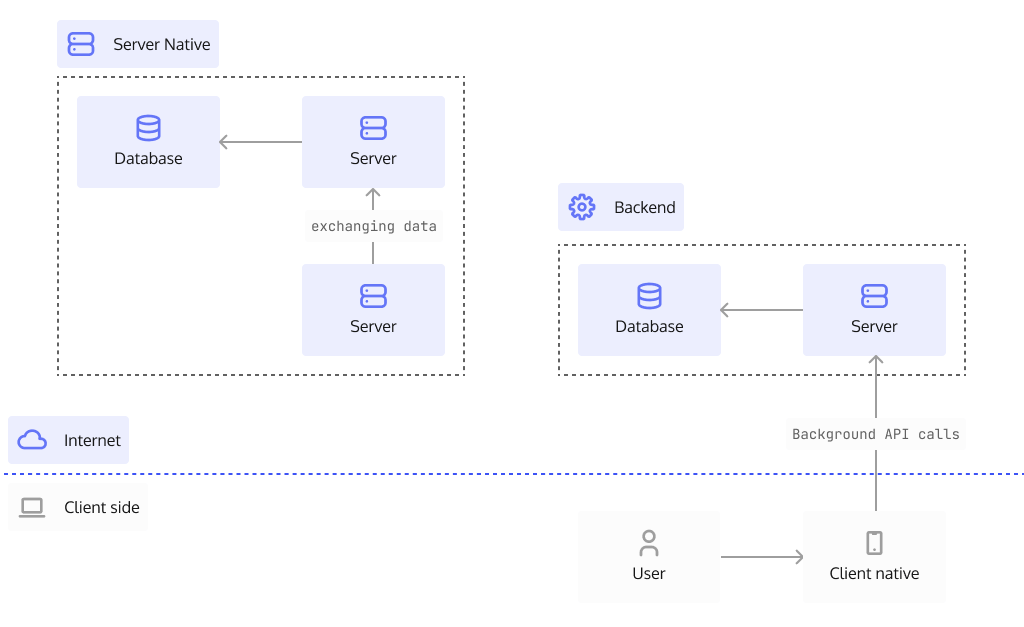
Native Applications
Applications that run on Android, iOS, desktop or servers are all forms of
native applications. These applications usually provide native performance and
utilize the operating system to render the user interface (UI).
Examples of frameworks that allow for native application development are
Android, iOS
and .NET.
Command Line Interface (CLI) applications executed using a terminal or command
line on the operating system also fall into the category of native applications.
They can be built with such languages as Go,
C++, Python, or
NodeJs.
The Problem
As you can see, modern developers can choose from a plethora of approaches,
architectures, and technologies when creating their applications. What about
authentication in that context?
Every approach and technology requires a unique, specialized approach that
changes depending on the application and the infrastructure it runs on.
Digging deeper into the app classification established in the previous section,
let's see how authentication can be handled in applications depending on their
runtime environment: browser, server-side, and native.
Browsers
When it comes to browser-rendered apps, a lot's been said about implementing
authentication. This leads to many different (often conflicting) views on what's
the best solution and approach for handling sessions, which include:
- JWT tokens
- OAuth2 access tokens
- Cookies
To choose the best approach for browser-rendered apps, we must explore the
different available session storage mechanisms, their limitations, and
advantages.
| Storage Type | Cookie (httpOnly) | sessionStorage | localStorage | Web Workers |
|---|
| Persists | ✅ | ❌ | ✅ | ✅ |
| Origin Scoped | ✅ | ✅ | ✅ | ✅ |
| Accessible to JavaScript | ❌ | ✅ | ✅ | ✅ |
To better understand the drawbacks of each of these storage types, let's use a
hypothetical user who interacts with the app. We shall call her Alice.
Alice visits example.com and gets a token with session data stored in her
browser. When it comes to any of the storage types, we can see that all of them
are scoped to the origin, meaning the data stored on example.com can only be
extracted on example.com.
With the token saved in localStorage and sessionStorage, any rogue
JavaScript on example.com can extract that information and use the token
somewhere else to impersonate her.
The third mechanism is cookies - note the httpOnly attribute - which gives you
data-scoping, data persistence (until the set expiry time), but no JS access.
Web Workers is JavaScript code that runs in the background, independently of
other scripts, without affecting the performance of the page. Storing the
session data there looks like a perfect solution since no limitations of the
other 3 mechanisms apply: the data is scoped, persistent, and JS accessible.
So I guess it's settled then? Web Workers are the way to go, right? 🤔
The answer isn't so simple. Quoting from the
OWASP Session Management Cheat sheet
we can see that access to secrets (session values) complicates things a bit:
The advantage of a Web Worker implementation compared to an HttpOnly cookie is
that a Web Worker allows for some isolated JavaScript code to access the
secret; an HttpOnly cookie is not accessible to any JavaScript. If the
frontend JavaScript code requires access to the secret, the Web Worker
implementation is the only browser storage option that preserves the secret
confidentiality.
We can consider the requirement to access session values by JavaScript a niche
case, but it still has some major implications. It makes you responsible for
making sure the secret is not leaked, either by careless coding or introducing
bugs, just like with localStorage and sessionStorage.
Naturally, you don't want this responsibility to be yours. Using cookies is a
great alternative in this situation as the responsibility for keeping secrets
secure is transferred over to the browser.
What's great about cookies is that they provide all the features we want and
need for session storage minus the headache of managing them as they're
browser-managed. This also decreases the risk of a security vulnerability
leaking the session. They persist after tabs or windows close (until their
expiry date) and are scoped to the origin. We can even ensure they are not
transmitted over unsecured channels by using the Secure attribute.
Server-Side and Native Applications
Server-side and native applications have their own set of problems, however,
they are usually easier in storing sensitive information since the environment
they run in is by definition more secure. This of course does rely on your
security practices, such as who has access to your servers.
But - for argument’s sake - let's assume that the environment the application
works in is secure. In such a case, tokens can easily be issued to a server and
kept in memory. There's no need to store them on disk since, hopefully, your
server does not restart every couple of hours. 😉
Mobile device running Android and iOS each have their own methodologies for
storing tokens, but it all comes down to the same concept, as these systems
inherently do not share storage with other apps on the device (which is not
guaranteed on rooted/jailbroken devices, though).
Conclusion
As it's usually the case with complex problems, there's no one-size-fits-all
security solution that's suitable for use in every scenario.
It's always a good idea to rely on good, factual resources such as
OWASP to learn how to better understand and avoid security
pitfalls.
When making the choice, you should evaluate all the pros and cons with your
specific requirements in mind, rather than make choices based on opinions or
conventions. You should treat articles like this one as a means to learn more
about the approaches you know and to stay up to date with the latest
developments in the field.
At Ory, we decided that Kratos should use cookies
(httpOnly) when using browsers, and tokens when using native applications. As
you can see, we mixed and matched to make sure we get exactly what we need.
No matter what approach you choose, keep your cookies crisp and your apps
secure. Happy hacking!
If you want to know more about cookies and their attributes, I would strongly
suggest checking out
OWASP Testing Cookies.
To understand more about the vulnerabilities associated with JavaScript and
Cross Site Scripting (XSS) please refer to the
OWASP XSS document.