Relationship-based permissions are hard to reason about in your head. You define namespaces, write permits blocks, load tuples, and then try to mentally trace whether User A can actually view Document B through some chain of team memberships and role grants.
I built the Keto Playground because I kept hitting that wall, both when I was learning Ory Keto myself and when I was demoing it for customers who had the same "ok but what actually happens" look on their face.
The most common thing I hear from teams looking at Ory Keto isn't "can it do X?" It's "how do I even get started?" And that's fair. Relationship-based access control is a different mental model than RBAC or ABAC. You're not assigning roles and checking them at request time. You're building a graph of relationships between entities and traversing that graph to derive permissions.
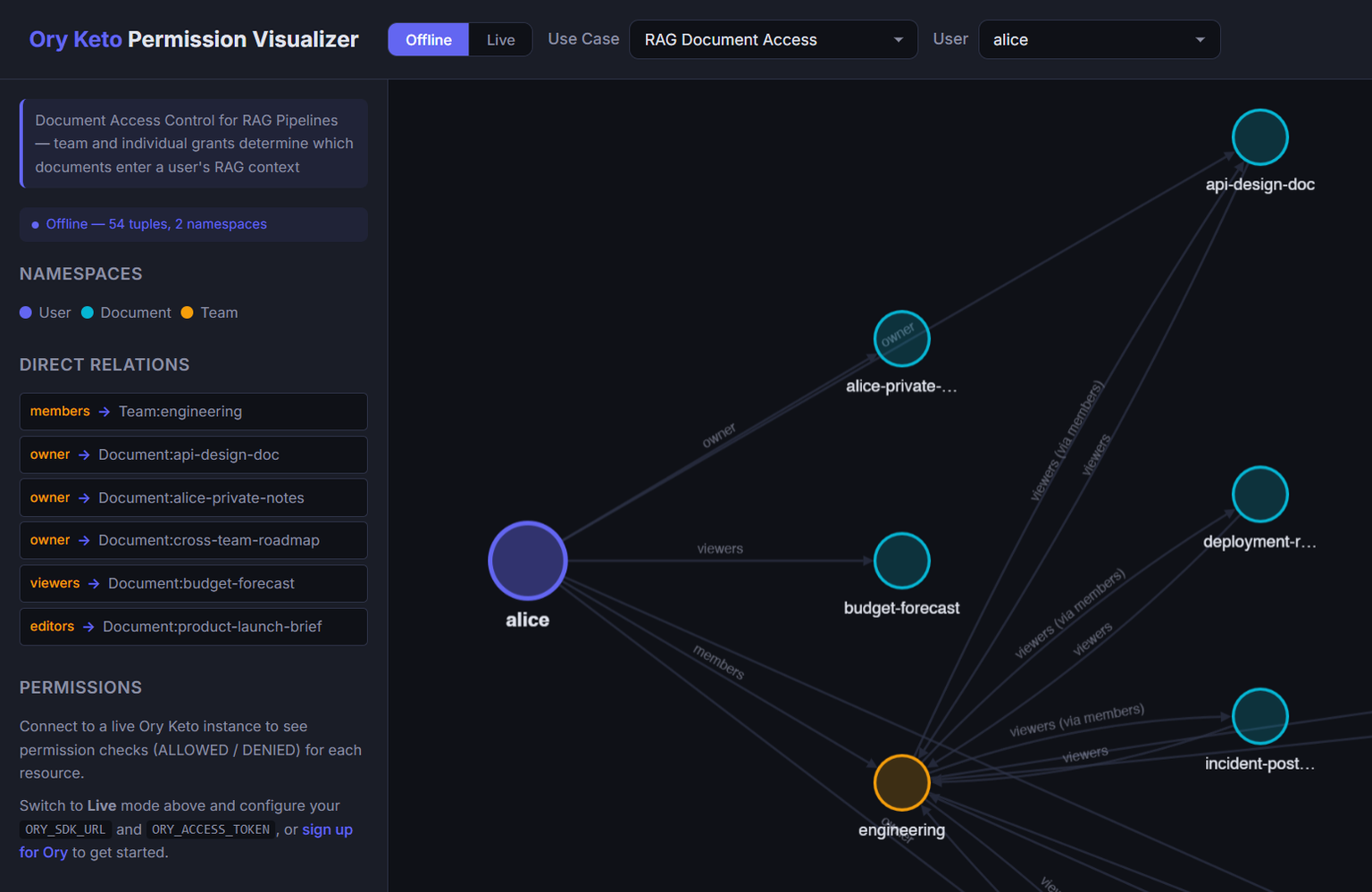
That concept clicks way faster when you can see it. Pick a user, watch their connections fan out across the graph, see each permission resolve to ALLOWED or DENIED. The model stops being abstract. That's the whole point of the playground.
What the Keto Playground actually does
It's a React app that renders Keto permission graphs as interactive directed visualizations. You pick a use case, select an identity, and the app draws the full relationship graph for that identity. Namespaces are color-coded, edges are labeled with relation names, and a sidebar shows every permission check result.
Two modes:
- Offline mode ships with seven bundled examples and needs no Keto instance, no setup, nothing. Pick a use case, pick a user, and start exploring the permission graph right in the browser. You can visualize the full model and figure out if it fits your use case before committing to any infrastructure.
- Online mode connects to an Ory Network project, pulls real tuples, and lets you actually play with a live Keto instance. Once you've found a model you like in offline mode, run the bundled seed scripts to load it into Keto and start testing for real.
Offline mode is where most people should start. Get a feel for how the permission model works, then switch to online mode when you're ready to get your hands dirty.
Two examples I keep coming back to
These are the ones I get asked about the most in customer conversations, and they're solid starting points if you're trying to figure out how to model your own use case.
RAG document access
The scenario: you have documents feeding into a RAG pipeline and you need to control which users can access which documents based on team membership. Users belong to Teams. Documents have owners, editors, and team-level grants. The view permission resolves through either a direct relationship or a team membership chain.
The part that makes this specifically useful for RAG is the rag_include permission. It mirrors view, so your retrieval pipeline can call Keto's check API to filter documents before they ever hit the LLM context window. If a user can't view a document, it doesn't get included in their RAG context. The authorization boundary and the retrieval boundary become the same thing.
The example is fairly extensive. Multiple teams, a bunch of documents, and enough permission checks to validate that the model holds up across edge cases. You can pick any user and trace exactly which documents they reach and why.
B2B organizational hierarchy
This one models a three-level structure: Business, LineOfBusiness, and Customer. Roles at the Business level inherit downward into lines of business and then into customers, but access never bleeds across organizations.
This is one of those things that sounds simple to describe and gets surprisingly tricky to implement. An admin at acme-corp needs to manage customers across all of Acme's LOBs but should never see anything inside globex-inc. And a user scoped to a single LOB should only see customers in that LOB.
The graph view makes the inheritance chains obvious. Select a user at the Business level and watch permissions cascade down. Select a user at a different org and confirm there's zero path between them. If you're building a B2B SaaS and trying to figure out how to model your customer hierarchy in Keto, fork this example and start from there.
What else is bundled
Five more examples ship with the playground:
- RBAC bank accounts mixes staff roles (teller, auditor, branch admin) with family relationships on accounts, each with different permission levels.
- Healthcare records models patient-centric consent where access flows through care team membership, explicit consent grants, or emergency override.
- SaaS feature gating ties feature access to subscription tiers, so the check is "does this user's org have a plan that includes this feature?"
- RBAC app access is the simplest model if you just want to see basic role-based checks in Keto.
- Content publishing workflow handles editorial permissions across draft, review, and publish stages.
All of them are editable in offline mode. All ship with full OPL schemas and relationship tuples.
Get started with the Keto Playground
$ git clone https://github.com/ory/keto-playground.git
$ cd keto-playground/permission-visualizer
$ npm install && npm run dev
Open http://localhost:5173, pick an example, pick a user, and start exploring. Edit the schema or the tuples and see how permissions change. When you're ready to test against a real instance, switch to online mode and point it at your Ory Network project.
The repo is here. If you build a model you think others would find useful, open a PR.