Nowadays the engineering community has many products for authentication in their
frameworks. Lots of them have built-in features for authentication and a lot of
libraries available for social sign-in. We have the Django framework, Flask, and
python-social-auth to build almost everything we need to authenticate users in
the pythonic world.
In this article, I'll show you an example of how to add everything we need for
the user's authentication without writing lots of lines of code. The code used
in this blog post is available on
GitHub. We'll
use Flask,
flask cookie-cutter,
docker,
docker-compose,
Postgres,
Ory Kratos and
Ory Keto.
Let's take a look at the login flow of our application using Ory Kratos and Ory
Keto
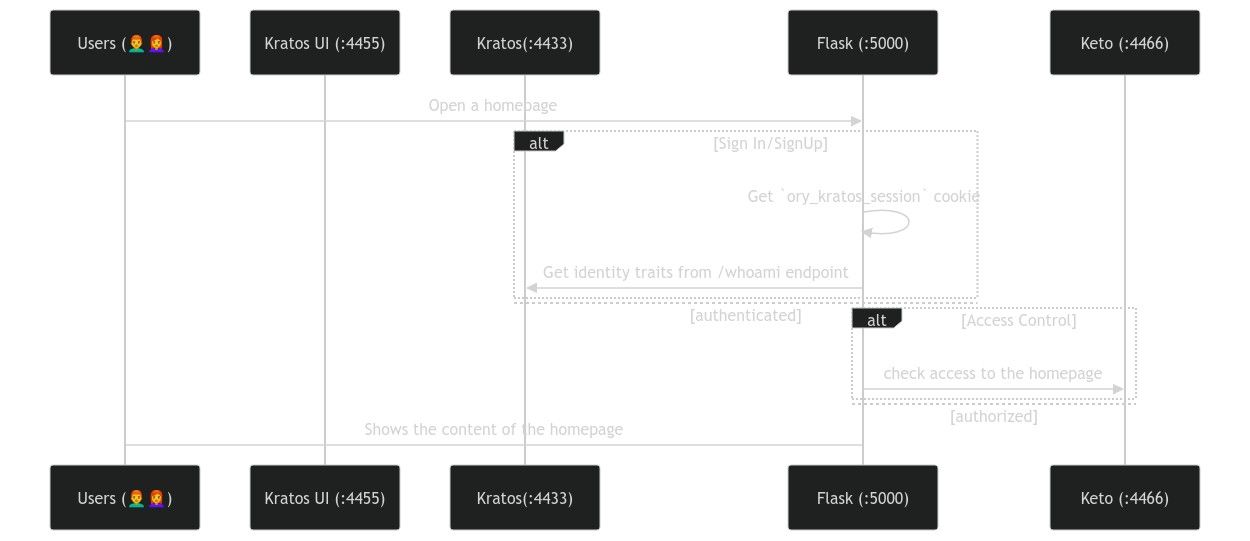
What we will use in our project
- Flask cookiecutter
is a great tool to bootstrap our project structure. It's always a great idea
to have ready-to-use linters, Dockerfile, and package management tools out of
the box.
- Postgres as an RDBMS. We will have two Postgres services running in two
containers in this example. I think that it's a great idea to keep it simple
without using custom scripts to have multiple databases available in a single
docker-compose service.
- Ory Kratos with UI to authenticate users.
- Ory Keto as an access control service.
Setting up Ory Kratos
Ory Kratos will be responsible for storing identity data such as email/login and
password. Using the quickstart
guide we need to copy the contents of
contrib/quickstart/kratos/email-password
to the root of your project and then add the following content to the
docker-compose:
// ...
  postgres-kratos:
    image: postgres:9.6
    ports:
      - "5432:5432"
    environment:
      - POSTGRES_USER=kratos
      - POSTGRES_PASSWORD=secret
      - POSTGRES_DB=kratos
    networks:
      - intranet

  kratos-migrate:
    image: oryd/kratos:v0.8.0-alpha.3
    links:
      - postgres-kratos:postgres-kratos
    environment:
      - DSN=postgres://kratos:secret@postgres-kratos:5432/kratos?sslmode=disable&max_conns=20&max_idle_conns=4
    networks:
      - intranet
    volumes:
      - type: bind
        source: ./kratos
        target: /etc/config/kratos
    command: -c /etc/config/kratos/kratos.yml migrate sql -e --yes

  kratos:
    image: oryd/kratos:v0.8.0-alpha.3
    links:
      - postgres-kratos:postgres-kratos
    environment:
      - DSN=postgres://kratos:secret@postgres-kratos:5432/kratos?sslmode=disable&max_conns=20&max_idle_conns=4
    ports:
      - "4433:4433"
      - "4434:4434"
    volumes:
      - type: bind
        source: ./kratos
        target: /etc/config/kratos
    networks:
      - intranet
    command: serve -c /etc/config/kratos/kratos.yml --dev --watch-courier

  kratos-selfservice-ui-node:
    image: oryd/kratos-selfservice-ui-node:v0.8.0-alpha.3
    environment:
      - KRATOS_PUBLIC_URL=http://kratos:4433/
      - KRATOS_BROWSER_URL=http://127.0.0.1:4433/
    networks:
      - intranet
    ports:
      - "4455:3000"
    restart: on-failure

  mailslurper:
    image: oryd/mailslurper:latest-smtps
    ports:
      - "4436:4436"
      - "4437:4437"
    networks:
      - intranet

  postgres-keto:
// ...
Setting up Ory Keto
You can get familiar with the
concepts of Ory Keto
reading the quickstart guide. These
articles can give you a brief introduction to it. Since we need to manage access
to the home page, we need to create a folder keto at the root of our project
and have a keto/keto.yml file with the following content:
version: v0.7.0-alpha.1

log:
  level: debug

namespaces:
  - name: app
    id: 1

serve:
  read:
    host: 0.0.0.0
    port: 4466
  write:
    host: 0.0.0.0
    port: 4467
We need the following containers:
- postgresd-auth is the database for Ory Keto.
- keto-migrate that takes care of database migrations.
- keto-perms is a wrapper to work with permissions using a command-line
interface.
- keto runs the server.
version: "3.7"

x-default-volumes: &default_volumes
  volumes:
    - ./:/app
    - node-modules:/app/node_modules
    - ./dev.db:/tmp/dev.db

services:
  oathkeeper:
    image: oryd/oathkeeper:v0.38
    depends_on:
      - kratos
    ports:
      - 8080:4455
      - 4456:4456
    command: serve proxy -c "/etc/config/oathkeeper/oathkeeper.yml"
    environment:
      - LOG_LEVEL=debug
    restart: on-failure
    networks:
      - intranet
    volumes:
      - ./oathkeeper:/etc/config/oathkeeper

  flask:
    build:
      context: .
    image: "kratos_app_example-development"
    environment:
      - FLASK_APP=autoapp.py
      - FLASK_ENV=development
    networks:
      - intranet
    restart: on-failure
    volumes:
      - type: bind
        source: ./
        target: /app

  postgres-kratos:
    image: postgres:9.6
    ports:
      - "5432:5432"
    environment:
      - POSTGRES_USER=kratos
      - POSTGRES_PASSWORD=secret
      - POSTGRES_DB=kratos
    networks:
      - intranet

  kratos-migrate:
    image: oryd/kratos:v0.8.0-alpha.3
    links:
      - postgres-kratos:postgres-kratos
    environment:
      - DSN=postgres://kratos:secret@postgres-kratos:5432/kratos?sslmode=disable&max_conns=20&max_idle_conns=4
    networks:
      - intranet
    volumes:
      - type: bind
        source: ./kratos
        target: /etc/config/kratos
    command: -c /etc/config/kratos/kratos.yml migrate sql -e --yes

  kratos:
    image: oryd/kratos:v0.8.0-alpha.3
    links:
      - postgres-kratos:postgres-kratos
    environment:
      - DSN=postgres://kratos:secret@postgres-kratos:5432/kratos?sslmode=disable&max_conns=20&max_idle_conns=4
    ports:
      - "4433:4433"
      - "4434:4434"
    volumes:
      - type: bind
        source: ./kratos
        target: /etc/config/kratos
    networks:
      - intranet
    command: serve -c /etc/config/kratos/kratos.yml --dev --watch-courier

  kratos-selfservice-ui-node:
    image: oryd/kratos-selfservice-ui-node:v0.8.0-alpha.3
    environment:
      - KRATOS_PUBLIC_URL=http://kratos:4433/
      - KRATOS_BROWSER_URL=http://127.0.0.1:4433/
    networks:
      - intranet
    ports:
      - "4455:3000"
    restart: on-failure

  mailslurper:
    image: oryd/mailslurper:latest-smtps
    ports:
      - "4436:4436"
      - "4437:4437"
    networks:
      - intranet

  postgres-keto:
    image: postgres:9.6
    ports:
      - "15432:5432"
    environment:
      - POSTGRES_USER=keto
      - POSTGRES_PASSWORD=secret
      - POSTGRES_DB=keto
    networks:
      - intranet

  keto-migrate:
    image: oryd/keto:v0.7.0-alpha.1
    volumes:
      - type: bind
        source: ./keto
        target: /home/ory
    environment:
      - LOG_LEVEL=debug
      - DSN=postgres://keto:secret@postgres-keto:5432/keto?sslmode=disable&max_conns=20&max_idle_conns=4
    command: ["migrate", "up", "-y"]
    restart: on-failure
    depends_on:
      - postgres-kratos
    networks:
      - intranet

  keto-perms:
    image: oryd/keto:v0.7.0-alpha.1
    volumes:
      - type: bind
        source: ./keto
        target: /home/ory
    environment:
      - KETO_WRITE_REMOTE=keto:4467
      - KETO_READ_REMOTE=keto:4466
      - LOG_LEVEL=debug
      - DSN=postgres://keto:secret@postgres-keto:5432/keto?sslmode=disable&max_conns=20&max_idle_conns=4
    depends_on:
      - postgres-kratos
    networks:
      - intranet

  keto:
    image: oryd/keto:v0.7.0-alpha.1
    volumes:
      - type: bind
        source: ./keto
        target: /home/ory
    ports:
      - "4466:4466"
      - "4467:4467"
    depends_on:
      - keto-migrate
    environment:
      - DSN=postgres://keto:secret@postgres-keto:5432/keto?sslmode=disable&max_conns=20&max_idle_conns=4
    networks:
      - intranet
    command: serve

volumes:
  node-modules:
  kratos-sqlite:

networks:
  intranet:
Working with policies
Ory Keto has configured a namespace app to use in the Flask application.
Following the guide
Check whether a User has Access to Something
I decided to implement a simple permission policy for the demo project:
Pros
- Easy to use and maintain.
- Can easily be automated using CI/CD pipelines.
Cons
- Lack of UI can be dealbreaker for non-engineering staff
- This permission policy can violate GDPR,
HIPAA or any other
compliances due to personal data usage.
Flask part
// ...
HTTP_STATUS_FORBIDDEN = 403
@blueprint.route("/", methods=["GET", "POST"])
def home():
"""Home page."""
if 'ory_kratos_session' not in request.cookies:
return redirect(settings.KRATOS_UI_URL)
response = requests.get(
f"{settings.KRATOS_EXTERNAL_API_URL}/sessions/whoami",
cookies=request.cookies
)
active = response.json().get('active')
if not active:
abort(HTTP_STATUS_FORBIDDEN)
email = response.json().get('identity', {}).get('traits', {}).get('email').replace('@', '')
response = requests.get(
f"{settings.KETO_API_READ_URL}/check",
params={
"namespace": "app",
"object": "homepage",
"relation": "read",
"subject_id": email,
}
)
if not response.json().get("allowed"):
abort(HTTP_STATUS_FORBIDDEN)
return render_template("public/home.html")
@blueprint.route("/oathkeeper", methods=["GET", "POST"])
def oathkeeper():
""" An example route to demo oathkeeper integration with Kratos """
return {"message": "greetings"}
You can find the full code used for this blog post on
GitHub.
Nota bene
- Consider having
authorization and authentication packages that use the
Ory Kratos SDK and the
Ory Keto SDK. Instead of just
calling magic endpoints, your code will be more readable when using an SDK.
- Please pay attention to configure
login session and
cookies.
- Skip the set up with the
Ory Network.
Next steps
- Add Two Factor Authentication (2FA) to your App
- Add social signin features
- Configure more secure password policies
- Implement email and phone verification and account Activation