A single spike day can inflate your MAU count by 5-7x. Learn how aDAU pricing works, estimate the difference for your application, and compare costs across billing models.
Relationship-based permissions are hard to reason about in your head. The Keto Playground renders permission graphs as interactive visualizations so you can see exactly how relationships resolve to ALLOWED or DENIED. It ships with seven bundled examples you can explore and edit in the browser with zero setup.
Account linking improves UX but can expose users to account takeover. Learn about key risks, safe design patterns, and how providers like Google and Apple handle email verification.
Learn how to implement secure MCP servers with Ory and OAuth 2.1 in this step-by-step guide. Protect your AI agents against unauthorized access while enabling standardized interactions.
Add authentication and user management to your Next.jsReact app using the new
Next.js Edge Runtime and
the Ory Kratos identity server! This
example also contains end-to-end tests! To deploy the full and working project,
hit the button:
If you like watching videos instead of reading text, watch Vincent's video
tutorial!
Before we start, let's get some terminology out of the way:
At Ory, identity can mean any actor in a system (user, robot, service account,
...). The term user always refers to a human being sitting in front of a
browser or mobile app.
A session refers to a user's session in a browser or mobile app after they
have authenticated.
Self-Service refers to flows the user can do on their own - such as login,
registration, and so on. It does not require administrative / support
intervention.
Next.js Authentication with Ory Kratos
If you want to see a live demo right away, check out
this app in action.
You can find the source code for this guide on
GitHub. To give it a spin,
clone it and run the following commands:
git clone https://github.com/ory/kratos-nextjs-react-example.git
cd kratos-nextjs-react-example
npm i
Per default, this app uses the public playground deployment of Ory Kratos at
https://playground.projects.oryapis.com. To use it, simply run:
npm run dev
To use your own Ory Kratos instance, you can use the ORY_SDK_URL environment
variable. To get started we recommend to run Ory Kratos in an Ory Network
Project, which is free for developers. You can create a new project on
console.ory.com or you
via the Ory CLI. Install the
CLI with the package manager of your choice on
Linux,
macOs, or
Windows.
Create a new developer project with just two commands:
# Download the Ory CLI to your local directory:
bash <(curl https://raw.githubusercontent.com/ory/meta/master/install.sh) -b . ory
# Log into an existing account or create a new one:
./ory auth
# Create a new project:
./ory create project --name <your-project-name>
After the project has been created the CLI displays the project details:
Project created successfully!
ID            a0c23a9d-bd3b-4a20-a6c0-00a1ada73f49
SLUG	        laughing-ardinghelli-cvaggbj1hi
STATE	        running
NAME	        Example
Copy the SLUG, and set the ORY_SDK_URL to the
SDK URL of the project you just
created:
# If you run Ory Kratos in the Ory Network:
export ORY_SDK_URL=https://YOUR_PROJECT_SLUG_HERE.projects.oryapis.com

# Start the app
npm run dev
Next head over to http://localhost:3000/ to see the
app in action with login, registration - a working user management!
Ory Kratos on your Machine
You can also run Ory Kratos on your own machine and develop in a local
environment. A quick way to begin is to run the
Ory Kratos Docker quickstart as it
includes all the necessary dependencies. You can run Ory Kratos without Docker
as well!
When deploying Ory Kratos yourself, set the ORY_SDK_URL to your local Ory
Kratos instance:
# If you run Ory Kratos locally using the Docker quick start:
export ORY_SDK_URL=http://localhost:4455/

# Start the app
npm run dev
Next head over to http://localhost:3000/ to see the
app in action with login, registration - a working user management!
Create a Next.js Single Page App with Ory Kratos from Scratch
To add login / auth to your Next.js app, first create a new Next.js project
npx create-next-app@latest --typescript
and install the Ory Kratos SDK as well as Ory's NodeJS integration helpers
npm i --save @ory/integrations @ory/kratos-client
Then we will add Ory's Next.js Edge-Integration helpers to our project, which
will act as a tunnel to Ory Kratos. You can either conveniently copy this route
from our reference application
or manually create a file called pages/api/.ory/[...paths].js in your NextJS
project and copy the following contents:
// @ory/integrations offers a package for integrating with NextJS.import { config, createApiHandler } from'@ory/integrations/next-edge'// We need to export the config.export { config }
// And create the Ory Cloud API "bridge".exportdefaultcreateApiHandler({
fallbackToPlayground: true,
// Because vercel.app is a public suffix and setting cookies for// vercel.app is not possible.dontUseTldForCookieDomain: true
})
Add the Ory Kratos SDK to your Next.js App
Great, now you have a NextJS app with a login route. If the user is
authenticated we want to show the session. If the user is not signed in, we want
to offer a way to sign up or sign in! Let's take a look at the home page. First,
we need to add the Ory Kratos SDK to our Next.js app:
// ...import { Configuration, Session, V0alpha2Api } from'@ory/kratos-client'import { AxiosError } from'axios'import type { NextPage } from'next'importHeadfrom'next/head'import { useEffect, useState } from'react'// Initialize the Ory Kratos SDK which will connect to the// /api/.ory/ route we created in the previous step.const kratos = newV0alpha2Api(newConfiguration(edgeConfig))
// ...
Easy, right? The package @ory/integrations takes care of all the heavy lifting
for you and sets up the SDK so that it connects with the Next.js Edge function
we created in the step prior.
React Hook to Find Out if a User is Authenticated
Next let's figure out if the user is authenticated. We will use a React Hook to
check this. We also want to track any errors that may happen as well as creating
a logout url.
// ...constHome: NextPage = () => {
// Contains the current session or undefined.const [session, setSession] = useState<Session>()
// The URL we can use to log out.const [logoutUrl, setLogoutUrl] = useState<string>()
// The error message or undefined.const [error, setError] = useState<any>()
useEffect(() => {
// If the session or error have been loaded, do nothing.if (session || error) {
return
}
// Try to load the session.
kratos
.toSession()
.then(({ data: session }) => {
// Session loaded successfully! Let's set it.setSession(session)
// ...
Adding Login and Registration Links if the User is Not Authenticated
Let's also show the user a login and registration link if the user has no login
session yet
// ...constSignedOut = () => (
<>
Get started and{' '}
<ahref={'/api/.ory/self-service/registration/browser'}>
create an example account
</a>{' '}
or <ahref={'/api/.ory/self-service/login/browser'}>sign in</a>,{' '}
<ahref={'/api/.ory/self-service/recovery/browser'}>recover your account</a>{' '}
or{' '}
<ahref={'/api/.ory/self-service/verification/browser'}>
verify your email address
</a>
! All using open source{' '}
<ahref={'https://github.com/ory/kratos'}>Ory Kratos</a> in minutes with
just a{' '}
<ahref={
'https://www.ory.com/login-spa-react-nextjs-authentication-example-api/'
}
>
few lines of code
</a>
!
</>// ...
or the account settings and logout link if the user is authenticated!
As you can see, it is really easy to initialize login, registration, and profile
updates. Just create a link!
<a href="/api/.ory/self-service/login/browser"> will initialize the login
flow.
<a href="/api/.ory/self-service/registration/browser"> will initialize the
registration flow.
<a href="/api/.ory/self-service/settings/browser"> will initialize the
account settings flow (needs login).
<a href="/api/.ory/self-service/verification/browser"> will initialize the
(email, phone, ...) verification flow.
<a href="/api/.ory/self-service/recovery/browser"> will initialize the
(password, 2fa, ...) recovery flow.
Adding a Logout Link for Authenticated Users
To prevent certain types of attack vectors, such as Denial of Service, Ory
Kratos provides a secure logout mechanism. This involves first fetching a logout
URL from the Ory Kratos API and then redirecting the user to that URL if logout
is requested:
// ...// Since we have a session, we can also get the logout URL.return kratos
.createSelfServiceLogoutFlowUrlForBrowsers()
.then(({ data }) => {
setLogoutUrl(data.logout_url)
})
// ...
If we do not bind the logout URL to the user's session, it means that anyone
could load e.g. an image with the logout URL and logout the user without user
interaction:
Ory Kratos protects you from these type of attacks with the flow shown above.
Putting it all Together
You've made it! Clone the app and try it out right now!
git clone https://github.com/ory/kratos-nextjs-react-example.git
cd kratos-nextjs-react-example
npm i
Or look at the code we wrote above in full below:
import styles from'../styles/Home.module.css'import { edgeConfig } from'@ory/integrations/next'import { Configuration, Session, V0alpha2Api } from'@ory/kratos-client'import { AxiosError } from'axios'import type { NextPage } from'next'importHeadfrom'next/head'import { useEffect, useState } from'react'// Initialize the Ory Kratos SDK which will connect to the// /api/.ory/ route we created in the previous step.const kratos = newV0alpha2Api(newConfiguration(edgeConfig))
constSignedOut = () => (
<>
Get started and{' '}
<ahref={'/api/.ory/self-service/registration/browser'}>
create an example account
</a>{' '}
or <ahref={'/api/.ory/self-service/login/browser'}>sign in</a>,{' '}
<ahref={'/api/.ory/self-service/recovery/browser'}>recover your account</a>{' '}
or{' '}
<ahref={'/api/.ory/self-service/verification/browser'}>
verify your email address
</a>
! All using open source{' '}
<ahref={'https://github.com/ory/kratos'}>Ory Kratos</a> in minutes with
just a{' '}
<ahref={
'https://www.ory.com/login-spa-react-nextjs-authentication-example-api/'
}
>
few lines of code
</a>
!
</>
)
constHome: NextPage = () => {
// Contains the current session or undefined.const [session, setSession] = useState<Session>()
// The URL we can use to log out.const [logoutUrl, setLogoutUrl] = useState<string>()
// The error message or undefined.const [error, setError] = useState<any>()
useEffect(() => {
// If the session or error have been loaded, do nothing.if (session || error) {
return
}
// Try to load the session.
kratos
.toSession()
.then(({ data: session }) => {
// Session loaded successfully! Let's set it.setSession(session)
// Since we have a session, we can also get the logout URL.return kratos
.createSelfServiceLogoutFlowUrlForBrowsers()
.then(({ data }) => {
setLogoutUrl(data.logout_url)
})
})
.catch((err: AxiosError) => {
// An error occurred while loading the session or fetching// the logout URL. Let's show that!setError({
error: err.toString(),
data: err.response?.data
})
})
}, [session, error])
return (
<divclassName={styles.container}><Head><title>Create Next App</title><metaname="description"content="Generated by create next app" /><linkrel="icon"href="/favicon.ico" /></Head><mainclassName={styles.main}><h1className={styles.title}>
{session ? (
<>
You are signed in using <ahref="https://www.ory.com/">Ory</a>!
</>
) : (
<>
Add Auth to <ahref={'https://nextjs.org'}>Next.js</a> with{' '}
<ahref="https://www.ory.com/">Ory</a>!
</>
)}
</h1><pclassName={styles.description}>
{session ? (
<><ahref={'/api/.ory/self-service/settings/browser'}>
Update your settings
</a>{' '}
or{' '}
<adata-testid="logout"href={logoutUrl}aria-disabled={!logoutUrl}
>
sign out
</a>
!
</>
) : (
<SignedOut />
)}
</p>
<divclassName={styles.grid}><ahref="https://www.ory.com/docs"className={styles.card}><h2>Learn →</h2><p>Learn how to add auth* to your Next.js app!</p></a><ahref="https://www.ory.com/docs/kratos"className={styles.card}><h2>Documentation →</h2><p>
Find in-depth information about Ory Kratos' features and API.
</p></a><ahref="https://www.ory.com/docs/kratos/quickstart"className={styles.card}
><h2>Deploy →</h2><p>Deploy open source Ory Kratos in seconds</p></a><ahref="https://github.com/ory/kratos"className={styles.card}><h2>GitHub →</h2><p>Check out Ory Kratos on GitHub!</p></a></div>
{session ? (
<divclassName={styles.session}><><p>Find your session details below. </p><preclassName={styles.pre + ' ' + styles.code}><codedata-testid={'session-content'}>
{JSON.stringify(session, null, 2)}
</code></pre></>
</div>
) : null}
</main>
</div>
)
}
exportdefaultHome
Deploy to Vercel
The easiest way to deploy your Next.js app is to use the
Vercel Platform from the creators of Next.js. If you
have never deployed on Vercel, check out the
Next.js deployment documentation for more
details. Ensure that your build works:
npm run build
Then, set up your Vercel account and create a new app.
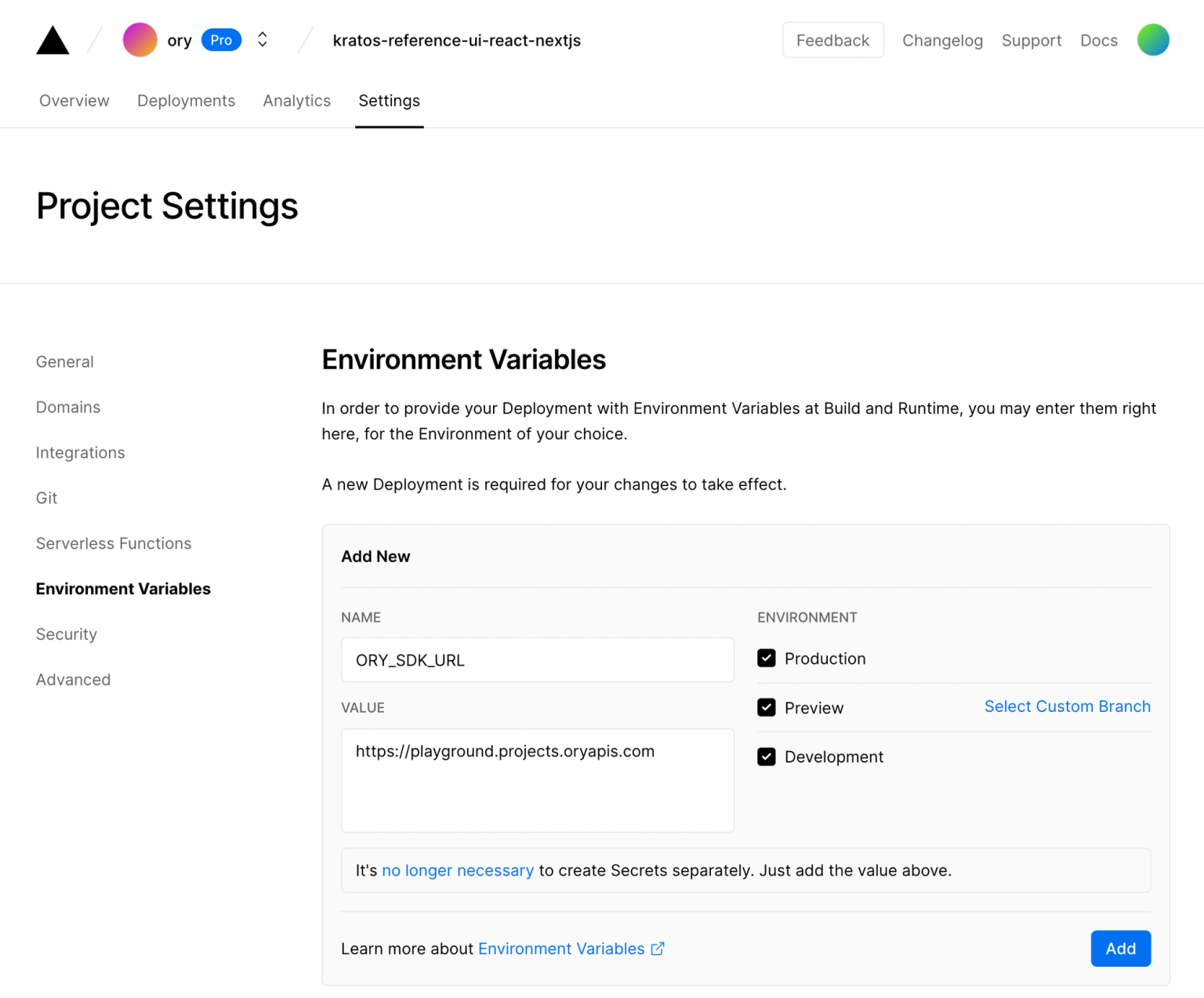
You will need to configure your
The Ory Network Project SDK URL
or the URL of your self-hosted Ory Kratos instance in your Vercel deployment:
tip
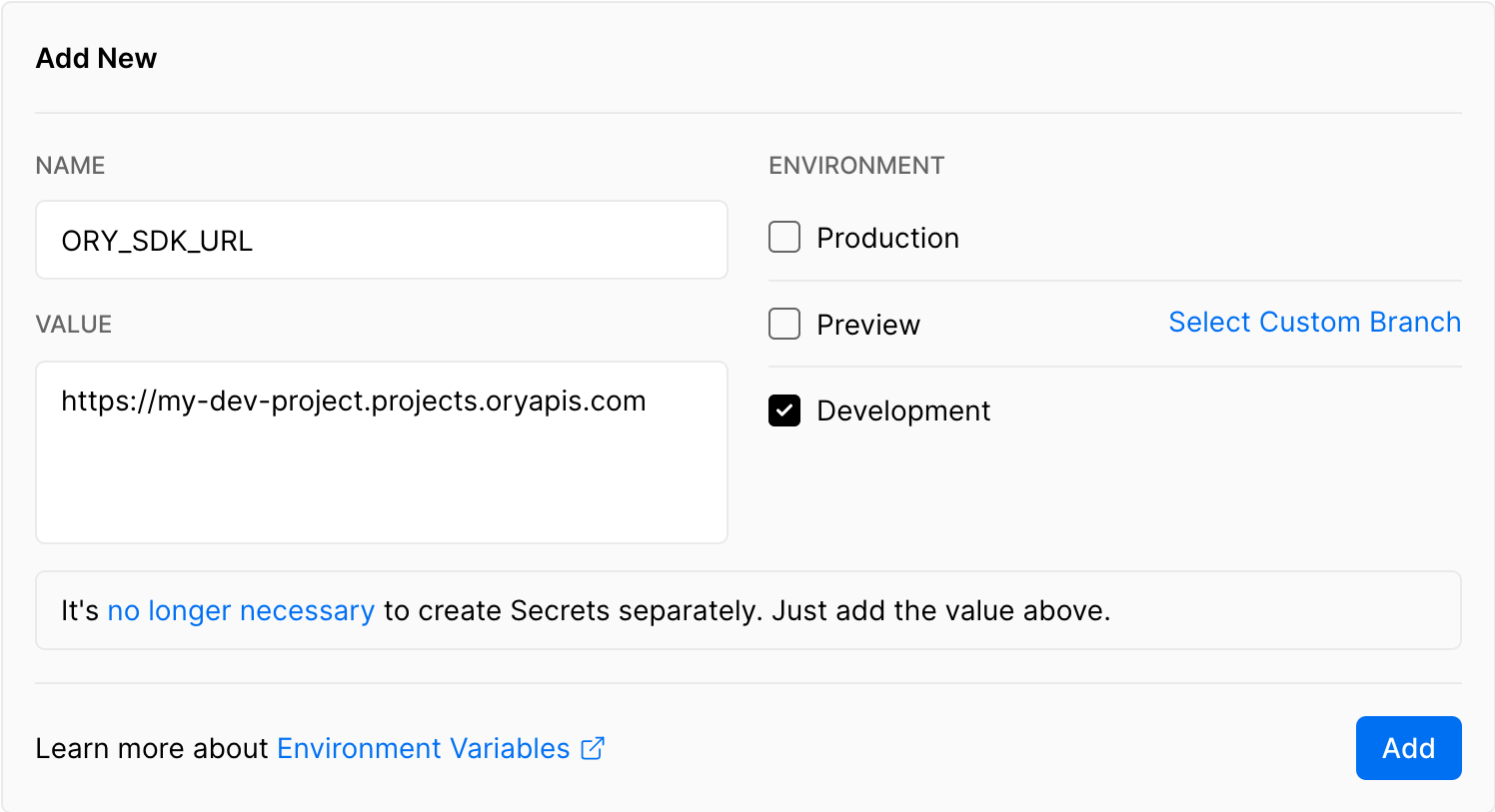
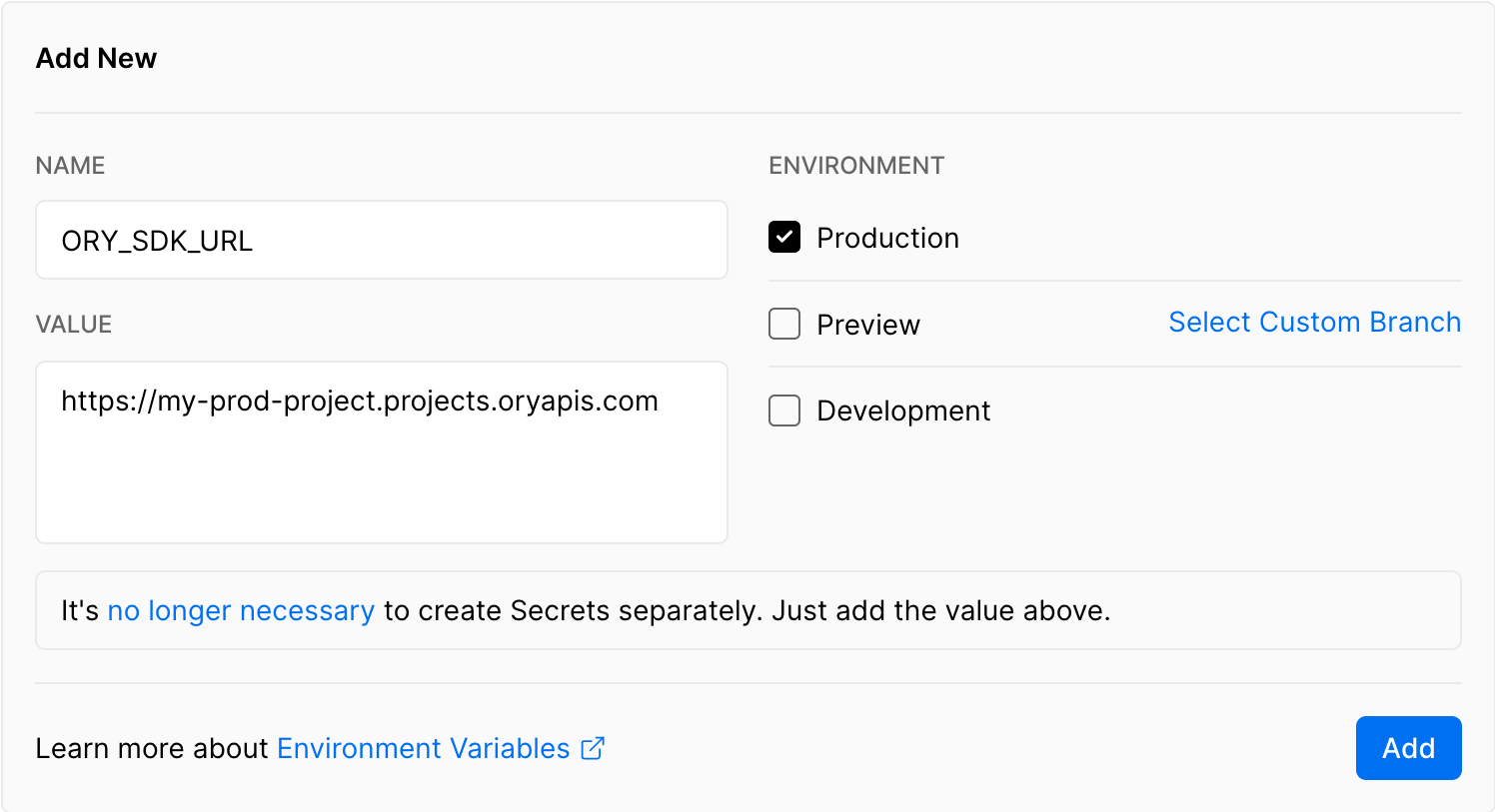
To separate Ory Kratos deployments for staging, production, and development, use
different SDK URLs for the different environments by un/selecting the checkboxes
in the Vercel UI:
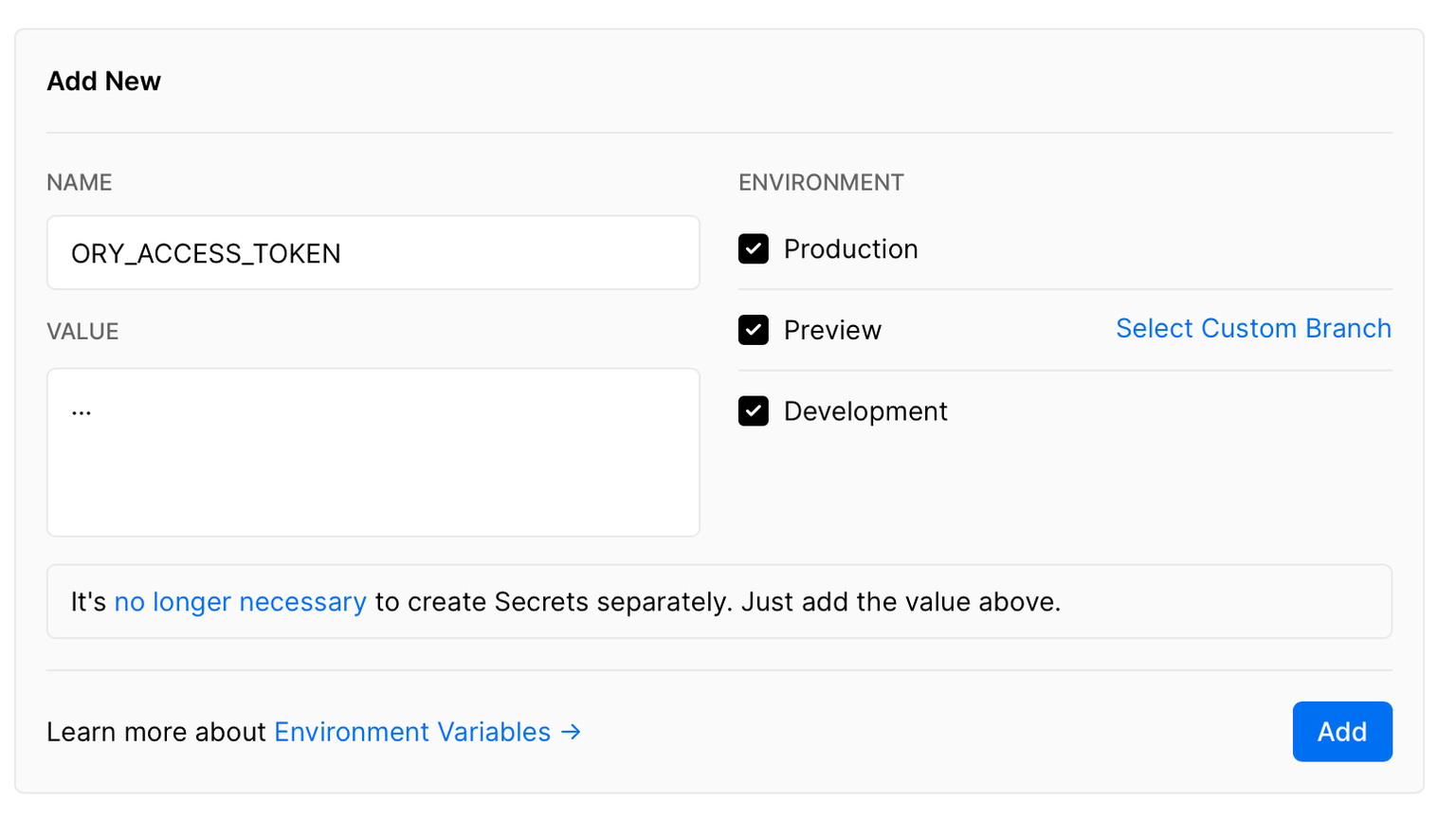
If you want to call the Ory Network's Admin APIs from your Next.js Edge
serverless functions, optionally set up the
Ory Personal Access Token:
Next all you need to do is to run the deploy command and connect it to the
project you created:
npx vercel deploy --prod
This also works with Vercel PR Preview!
End-to-End Tests
Adding end-to-end tests is also straightforward! Clone the repository and run
the following commands:
git clone https://github.com/ory/kratos-nextjs-react-example.git
cd kratos-nextjs-react-example
npm i
Then export the ORY_SDK_URL, as described above (switch out with your project
SLUG):
The GitHub Action file is also straight forward and contains two configurations,
one for running Ory Kratos locally and one for running Ory Kratos in the Ory
Network:
name:RunTestson:pull_request:push:branches:-main-masterjobs:test-cloud:runs-on:ubuntu-lateststeps:-uses:actions/checkout@v2-uses:actions/setup-node@v2with:node-version:'16'-run:npmci-run:npmrunformat:check-run:npmrunbuild-run:|
npm run start &
npm run test
env:ORY_KRATOS_URL:https://playground.projects.oryapis.com/test-self:runs-on:ubuntu-lateststeps:-uses:actions/checkout@v2-uses:actions/setup-node@v2with:node-version:'16'-run:npmci-run:npmrunformat:check-run:npmrunbuild-run:|
git clone --depth 1 --branch master https://github.com/ory/kratos.git ../kratos
cd ../kratos
make docker
docker-compose -f quickstart.yml -f quickstart-latest.yml -f contrib/quickstart/kratos/cloud/quickstart.yml up --build --force-recreate -d
-run:|
npm run start &
npm run test
env:ORY_KRATOS_URL:http://localhost:4455
Conclusion
Adding login and registration to your Next.js app is a breeze with open source
technology like Ory Kratos and
Next.js.
We hope you enjoyed this guide and found it helpful! If you have any questions,
check out the Ory community on Slack and
GitHub!