Microservice architecture is nowadays almost a standard for backend development.
An API gateway is an excellent way to connect a group of microservices to a
single API accessible to users. API gateways are available from cloud providers
such as AWS/Azure/Google Cloud Platform and Cloudflare. Kong is a scalable API
gateway built on open source and as such can be an excellent alternative if you
don't want to have your system locked in to a particular vendor.
This tutorial shows an example using Kong API gateway,
Ory Kratos, and
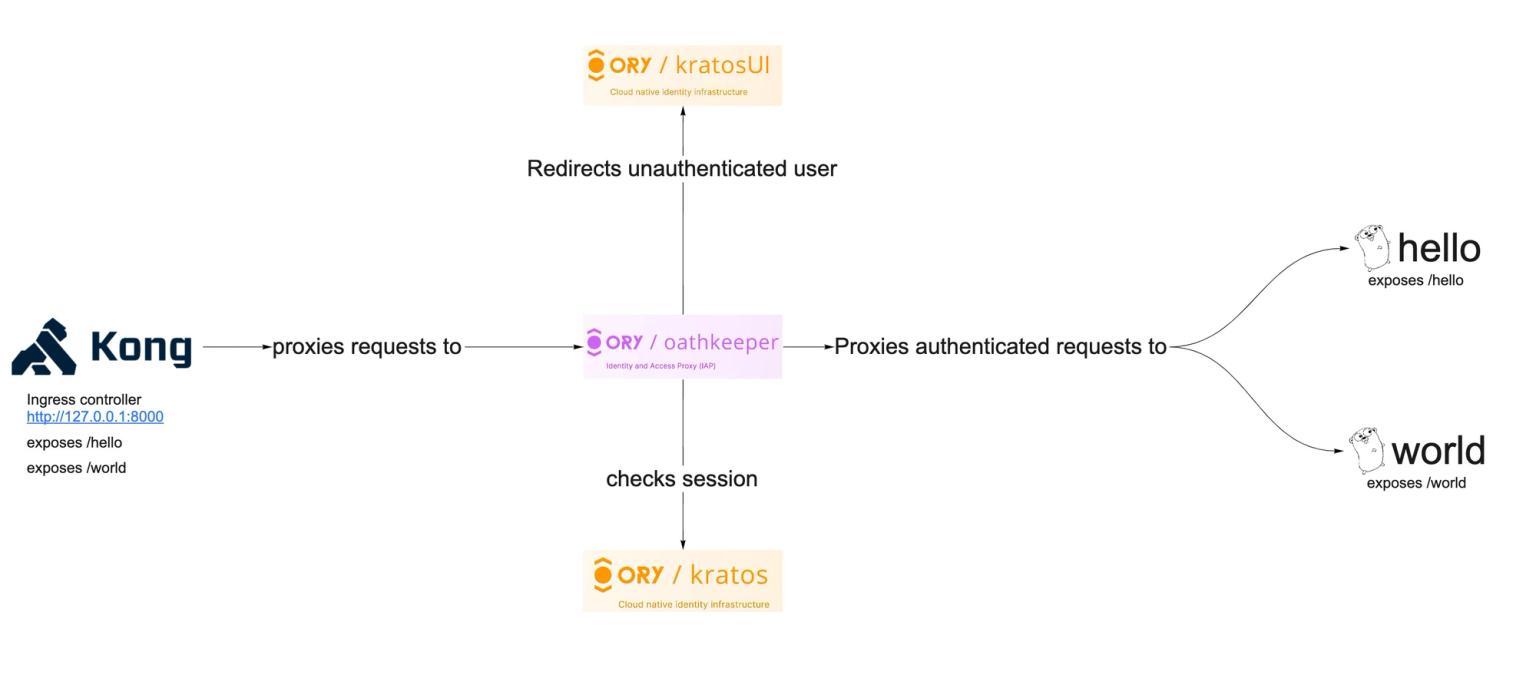
Ory Oathkeeper. The illustration below
shows you the final architecture we are going to build in this guide:
The full source code for this tutorial is available on GitHub.
What we will use
- Kong gateway can be an excellent solution for an
ingress load balancer and API gateway if you do not want vendor lock-in of any
cloud API Gateways in your application. Kong uses
OpenResty and Lua. OpenResty extends Nginx with
Lua scripting to use Nginx's event model for non-blocking I/O with HTTP
clients and remote backends like PostgreSQL, Memcached, and Redis. OpenResty
is not an Nginx fork, and Kong is not an Openresty fork. Kong uses OpenResty
to enable
API gateway features.
- Oathkeeper acts like an identity and access
proxy for our microservices. It allows to proxy only authenticated requests to
our microservices, and so we don't need to implement a middleware to check
authentication. It can also transform requests, for example convert session
auth into JWT for a back-end service.
- Kratos is the authentication provider; it
handles all first-party authentication flows: username/password, forgot
password, MFA/2FA, and more. It
also provides OIDC/social login capabilities for example "Login with GitHub".
Building simple microservices
Let's say we have two microservices: hello and world. They are pretty simple
and serve only to test our API gateway, but you can switch them out for more
complex components.
The "World" microservice exposes a /world API endpoint and returns a simple
JSON message:
package main
import (
"encoding/json"
"log"
"net/http"
)
type Response struct {
Message string `json:"message"`
}
func helloJSON(w http.ResponseWriter, r *http.Request) {
response := Response{Message: "World microservice"}
w.Header().Set("Content-type", "application/json")
w.WriteHeader(http.StatusOK)
json.NewEncoder(w).Encode(response)
}
func main() {
http.HandleFunc("/world", helloJSON)
log.Fatal(http.ListenAndServe(":8090", nil))
}
The "Hello" microservice exposes a /hello API endpoint and returns a simple
JSON message:
package main
import (
"encoding/json"
"log"
"net/http"
)
type Response struct {
Message string `json:"message"`
}
func helloJSON(w http.ResponseWriter, r *http.Request) {
response := Response{Message: "Hello microservice"}
w.Header().Set("Content-type", "application/json")
w.WriteHeader(http.StatusOK)
json.NewEncoder(w).Encode(response)
}
func main() {
http.HandleFunc("/hello", helloJSON)
log.Fatal(http.ListenAndServe(":8090", nil))
}
We now want to secure the access to these microservices and let only
authenticated users access these endpoints.

Okay. Let's start hacking, shall we?
Ory Kratos setup
Follow the Quickstart guide to set
up Ory Kratos. In this tutorial you only need a docker-compose file with the
following configuration:
// ...
  postgres-kratos:
    image: postgres:9.6
    ports:
      - "5432:5432"
    environment:
      - POSTGRES_USER=kratos
      - POSTGRES_PASSWORD=secret
      - POSTGRES_DB=kratos
    networks:
      - intranet

  kratos-migrate:
    image: oryd/kratos:v0.8.0-alpha.3
    links:
      - postgres-kratos:postgres-kratos
    environment:
      - DSN=postgres://kratos:secret@postgres-kratos:5432/kratos?sslmode=disable&max_conns=20&max_idle_conns=4
    networks:
      - intranet
    volumes:
      - type: bind
        source: ./kratos
        target: /etc/config/kratos
    command: -c /etc/config/kratos/kratos.yml migrate sql -e --yes

  kratos:
    image: oryd/kratos:v0.8.0-alpha.3
    links:
      - postgres-kratos:postgres-kratos
    environment:
      - DSN=postgres://kratos:secret@postgres-kratos:5432/kratos?sslmode=disable&max_conns=20&max_idle_conns=4
    ports:
      - "4433:4433"
      - "4434:4434"
    volumes:
      - type: bind
        source: ./kratos
        target: /etc/config/kratos
    networks:
      - intranet
    command: serve -c /etc/config/kratos/kratos.yml --dev --watch-courier

  kratos-selfservice-ui-node:
    image: oryd/kratos-selfservice-ui-node:v0.8.0-alpha.3
    environment:
      - KRATOS_PUBLIC_URL=http://kratos:4433/
      - KRATOS_BROWSER_URL=http://127.0.0.1:4433/
    networks:
      - intranet
    ports:
      - "4455:3000"
    restart: on-failure

  mailslurper:
    image: oryd/mailslurper:latest-smtps
    ports:
      - "4436:4436"
      - "4437:4437"
    networks:
      - intranet
Some notes on the network architecture:
- HTTP
:4433 and :4434 are the public and admin API's of Ory Kratos.
- HTTP
:4436 for Mailslurper - a mock Email server. You can get an activation
link by accessing http://127.0.0.1:4436.
- HTTP
:4455 for the UI interface that allows one to start
sign-up/login/recovery flows.
After running docker-compose up you can open http://127.0.0.1:4455/welcome
to test your configuration.
Configuring Ory Oathkeeper
Now we can start configuring our gateways for this example. Kong is the entry
point for the network traffic. Ory Oathkeeper would be accessible from the
internal network only in this case. Let's review our architecture diagram from
before:
Oathkeeper checks sessions and proxies traffic to our microservice while Kong
provides ingress load balancing. We can even set up
Round-Robin DNS to have a more
robust configuration for our service. Here is how we configure the access rules
for Ory Oathkeeper:
- id: "api:hello-protected"
  upstream:
    preserve_host: true
    url: "http://hello:8090"
  match:
    url: "http://oathkeeper:4455/hello"
    methods:
      - GET
  authenticators:
    - handler: cookie_session
  mutators:
    - handler: noop
  authorizer:
    handler: allow
  errors:
    - handler: redirect
      config:
        to: http://127.0.0.1:4455/login
- id: "api:world-protected"
  upstream:
    preserve_host: true
    url: "http://world:8090"
  match:
    url: "http://oathkeeper:4455/world"
    methods:
      - GET
  authenticators:
    - handler: cookie_session
  mutators:
    - handler: noop
  authorizer:
    handler: allow
  errors:
    - handler: redirect
      config:
        to: http://127.0.0.1:4455/login
The Ory Oathkeeper configuration:
log:
  level: debug
  format: json

serve:
  proxy:
    cors:
      enabled: true
      allowed_origins:
        - "*"
      allowed_methods:
        - POST
        - GET
        - PUT
        - PATCH
        - DELETE
      allowed_headers:
        - Authorization
        - Content-Type
      exposed_headers:
        - Content-Type
      allow_credentials: true
      debug: true

errors:
  fallback:
    - json

  handlers:
    redirect:
      enabled: true
      config:
        to: http://127.0.0.1:4455/login
        when:
          - error:
              - unauthorized
              - forbidden
            request:
              header:
                accept:
                  - text/html
    json:
      enabled: true
      config:
        verbose: true

access_rules:
  matching_strategy: glob
  repositories:
    - file:///etc/config/oathkeeper/access-rules.yml

authenticators:
  anonymous:
    enabled: true
    config:
      subject: guest

  cookie_session:
    enabled: true
    config:
      check_session_url: http://kratos:4433/sessions/whoami
      preserve_path: true
      extra_from: "@this"
      subject_from: "identity.id"
      only:
        - ory_kratos_session

  noop:
    enabled: true

authorizers:
  allow:
    enabled: true

mutators:
  noop:
    enabled: true
Ory Oathkeeper now looks up a valid session in the request cookies, and proxies
only authenticated requests. It redirects to login UI if there's no
ory_kratos_session cookie available.
Adding Kong
Now all that is needed is to configure Kong:
// ...
services:
kong-migrations:
image: "kong:2.7.2"
command: kong migrations bootstrap
depends_on:
- db
environment:
<<: *kong-env
networks:
- intranet
restart: on-failure
kong:
image: "kong:2.7.2"
environment:
<<: *kong-env
KONG_ADMIN_ACCESS_LOG: /dev/stdout
KONG_ADMIN_ERROR_LOG: /dev/stderr
KONG_PROXY_LISTEN: "${KONG_PROXY_LISTEN:-0.0.0.0:8000}"
KONG_ADMIN_LISTEN: "${KONG_ADMIN_LISTEN:-0.0.0.0:8001}"
KONG_PROXY_ACCESS_LOG: /dev/stdout
KONG_PROXY_ERROR_LOG: /dev/stderr
KONG_PREFIX: ${KONG_PREFIX:-/var/run/kong}
KONG_DECLARATIVE_CONFIG: "/opt/kong/kong.yaml"
networks:
- intranet
ports:
- "${KONG_INBOUND_PROXY_LISTEN:-0.0.0.0}:8000:8000/tcp"
- "${KONG_INBOUND_SSL_PROXY_LISTEN:-0.0.0.0}:8443:8443/tcp"
- "127.0.0.1:8001:8001/tcp"
- "127.0.0.1:8444:8444/tcp"
healthcheck:
test: ["CMD", "kong", "health"]
interval: 10s
timeout: 10s
retries: 10
restart: on-failure:5
read_only: true
volumes:
- kong_prefix_vol:${KONG_PREFIX:-/var/run/kong}
- kong_tmp_vol:/tmp
- ./config:/opt/kong
security_opt:
- no-new-privileges
db:
image: postgres:9.6
environment:
POSTGRES_DB: kong
POSTGRES_USER: kong
POSTGRES_PASSWORD: kong
healthcheck:
test: ["CMD", "pg_isready", "-U", "kong"]
interval: 30s
timeout: 30s
retries: 3
restart: on-failure
networks:
- intranet
hello:
// ...
The docker-compose creates three containers
- db container with PostgreSQL database to store the configuration of
services/routes for our API gateway.
- kong-migrate to run migrations against the database.
- kong container that exposes
8000 port for proxying traffic and 8001 port
with admin API.
As last step, we need to create a service for Kong and configure routes.
#!/bin/bash
curl -i -X POST \
--url http://localhost:8001/services/ \
--data 'name=secure-api' \
--data 'url=http://oathkeeper:4455'
curl -i -X POST \
--url http://localhost:8001/services/secure-api/routes \
--data 'paths[]=/'\
Testing
You can open http://127.0.0.1:8000/hello or http://127.0.0.1:8000/world in
your browser and there are two possible scenarios:
Further steps